Redirect Chain Detection Tools: Find & Fix Redirect Hops That Kill Affiliate Conversions
Redirect Chain Detection Tools: Find (and Fix) the Hops That Quietly Kill Affiliate Conversions
Redirect chains are one of those “barely noticeable” problems that quietly taxes conversions and makes tracking harder to trust. This isn’t just technical SEO housekeeping. It’s revenue leakage: extra latency, extra failure points, and more places for attribution to get weird.
My goal: help you detect redirect chains fast, prioritize the ones that matter, and fix them without breaking tracking—with a repeatable monthly workflow.
Key Takeaways
- Keep redirects to one hop whenever you can—start URL should go straight to the final destination (Conductor).
- Google usually follows up to five redirect hops in a single crawl; beyond that, it may abort (Conductor).
- Use the right tool for the job: single-link tracing (debug affiliate flows), bulk QA (validate fixes), and site-wide crawling (discover everything).
- Fix chains by redirecting the starting URL directly to the final target and updating internal links that still point at old URLs (Conductor; Screaming Frog tutorial).
- Affiliate-specific risk: a broken hop can mean dead commissions, and every extra hop adds another place for a 404, timeout, or consent layer to eat the click.
Run the boring checks first. They catch the expensive problems.
What counts as a redirect chain (vs. a loop) — and why affiliates should care
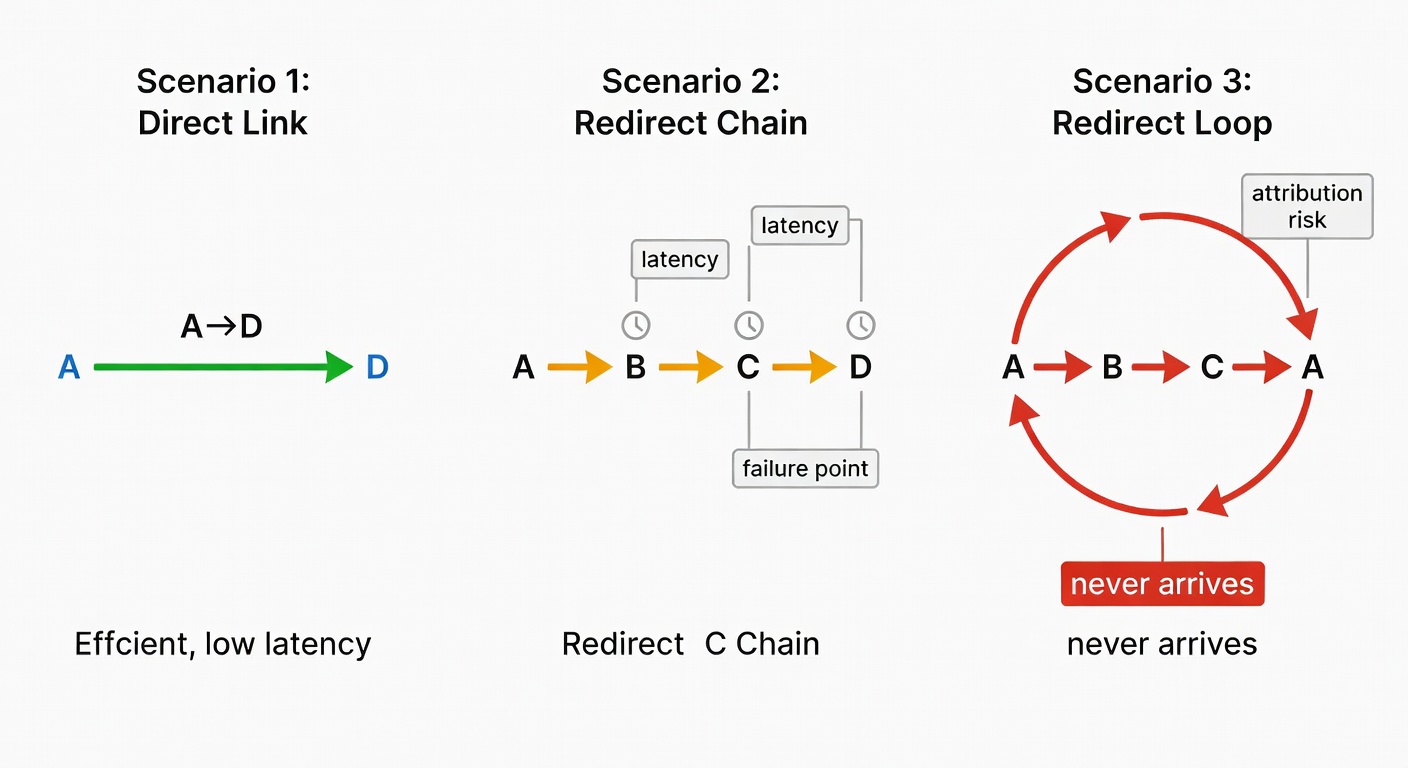
A redirect chain is when URL A redirects to B, then B redirects to C, before the user finally lands on the destination (Conductor; Adido Digital). Think: A → B → C → D.
A redirect loop is a closed circle—A → B → C → A—and the user never arrives (Adido Digital).
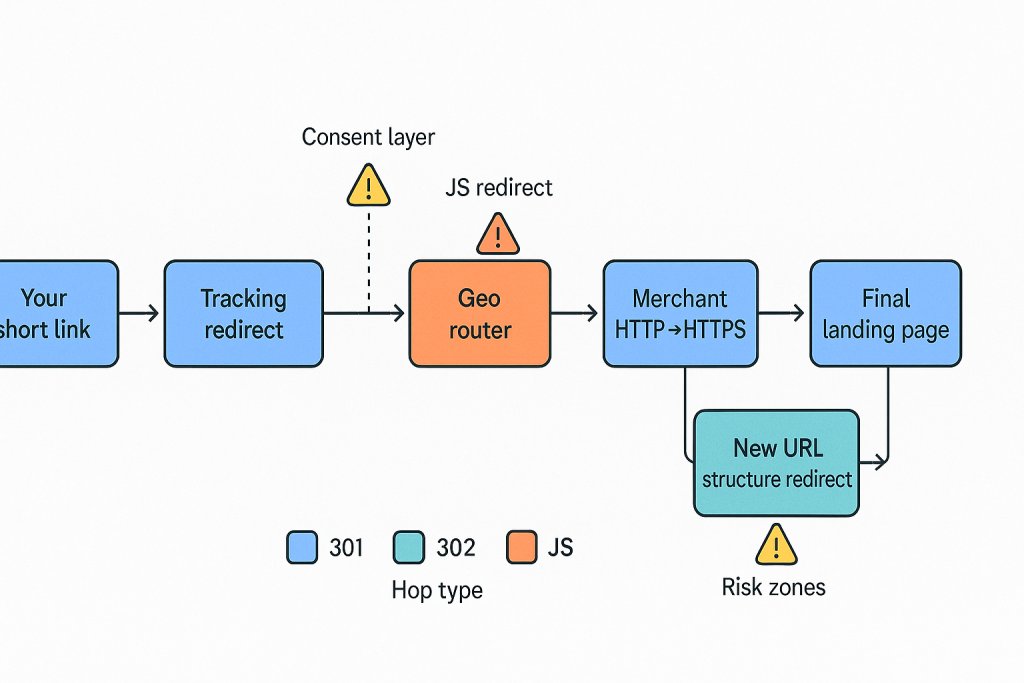
Affiliates don’t deal with one redirect system. A single click can hit: your short link → tracking domain → network redirect → geo router → merchant HTTP→HTTPS → “new URL structure” redirect. If you can’t explain the hop, you probably shouldn’t ship it.
Every hop is:
- more load time (more drop-off),
- another failure point (timeouts, 4xx/5xx),
- another place attribution can get stripped or misread (especially with JS/meta refresh).
The two failure modes I see most: migrations and ‘redirect debt’
Conductor calls out two common causes: oversights (redirects are “barely noticeable”) and migrations (teams forget to update old rules) (Conductor). That matches what I see.
Redirect debt is stacked rules nobody consolidates: HTTP→HTTPS, non-www→www, old slug→new slug, old taxonomy→new taxonomy. The links still “work,” but EPC slides because the click path gets slower and occasionally breaks mid-chain.
How many hops is ‘too many’? (The limits that actually matter)
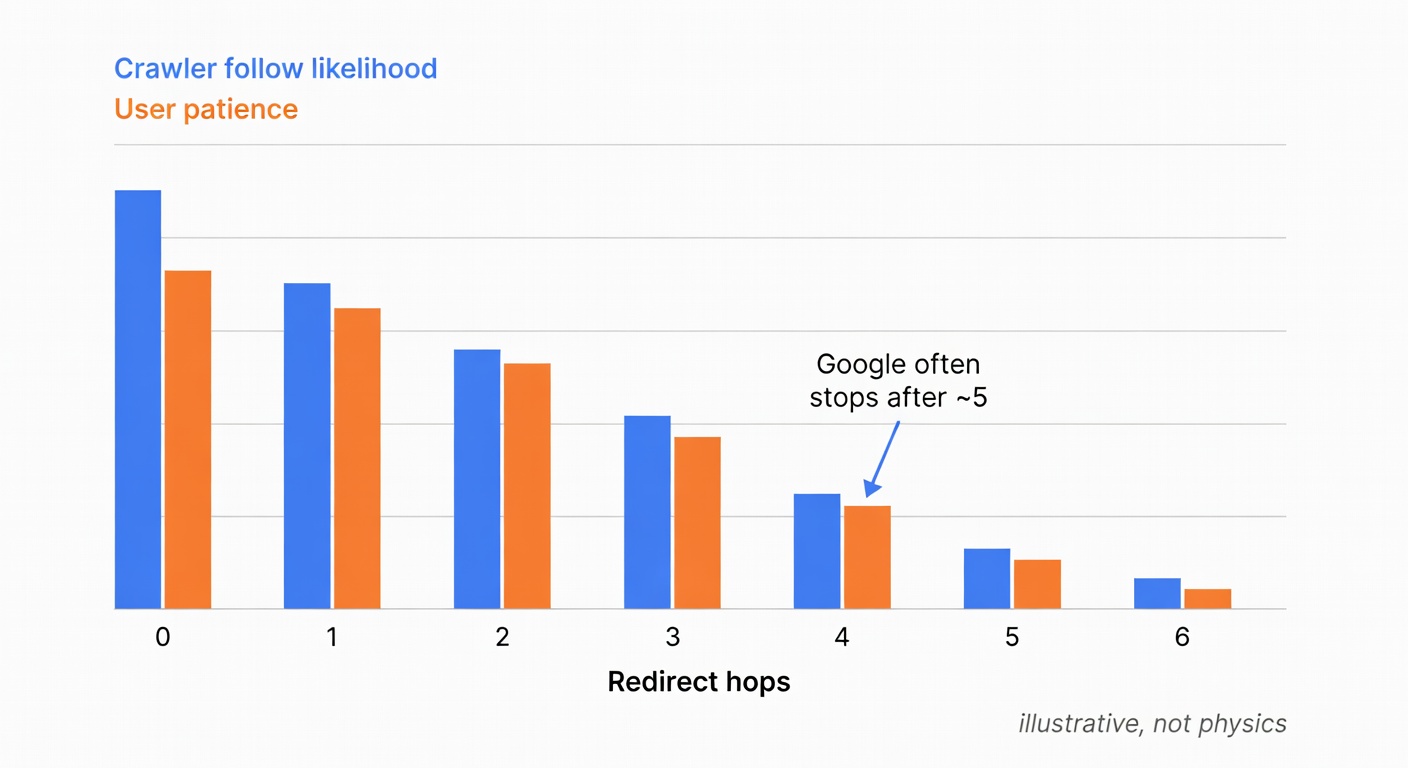
Google usually follows only up to five redirect hops in one crawl, then aborts to save resources (Conductor). That’s the SEO risk line.
But affiliates have a second limit: how many hops before humans bail.
Conductor also gives an illustrative model: assume ~5% link equity loss per redirect; with three redirects, the target gets 85.7% of the original equity (Conductor). Don’t treat the % like physics—treat it like a warning label. Extra hops are still extra failure points and extra round trips.
Tool stack: pick the right redirect chain detection tool for the job
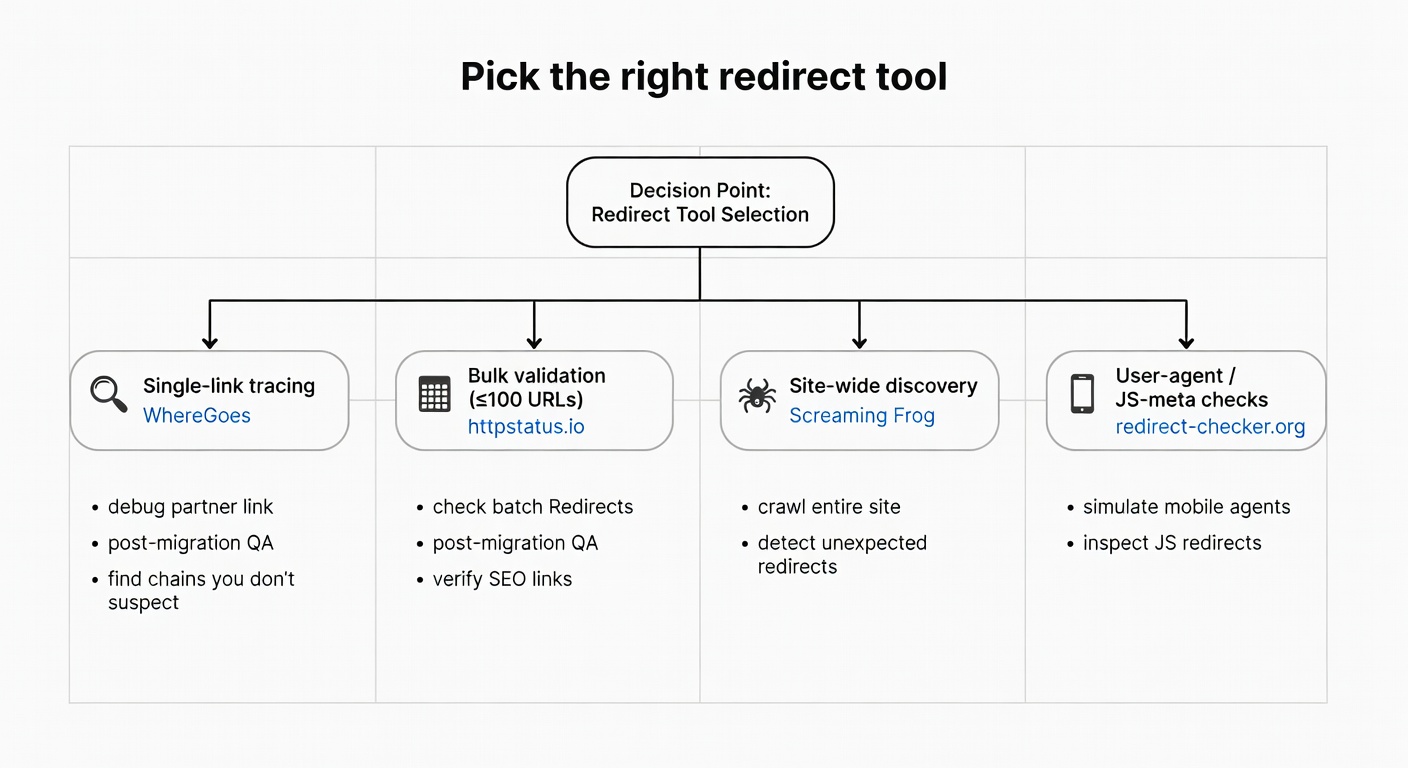
Skip the “20 tools” listicle. Use four buckets:
- Single URL tracing (debug one affiliate link)
- Bulk validation (QA a list of URLs)
- Site-wide discovery (find chains you don’t suspect)
- Post-fix QA (prove you didn’t break anything)
Tools I actually reach for:
- WhereGoes: shows the full redirection path for shortened/tiny URLs and can surface JavaScript/meta-refresh redirects (WhereGoes).
- httpstatus.io: bulk checks up to 100 URLs at once, shows up to 10 redirects, exports results, and can throttle requests (httpstatus.io).
- Screaming Frog SEO Spider: crawl-based discovery; audits redirect chains/loops; free version crawls 500 URLs (Screaming Frog).
- redirect-checker.org: user-agent switching; checks chains plus meta refresh/JS redirects (redirect-checker.org).
Single-link tracing (affiliate links, shorteners, ‘where does this go?’)
WhereGoes answers the only question that matters before you ship a high-traffic link: “Where does this go?” (WhereGoes).
Run the link and look for:
- unexpected extra hops,
- a mid-chain 302 you weren’t told about,
- a geo hop that sends some users somewhere else,
- anything JS/meta-refresh that might behave differently under consent.
Bulk QA (post-migration, partner link lists, ‘did we fix it?’)
httpstatus.io is my go-to for bulk validation: analyze up to 100 URLs simultaneously, show up to 10 redirects, export results, and throttle requests to avoid 429s (httpstatus.io).
Workflow:
- Pull a sample list (top money pages, top affiliate outlinks, legacy URLs partners still use).
- Run them through httpstatus.io.
- Export to CSV.
- Flag anything with >1 hop, any 4xx/5xx, and any “surprise” redirect type.
For “mobile goes somewhere else” problems, test different user agents with redirect-checker.org (redirect-checker.org).
Site-wide discovery (find every chain, not just the ones you suspect)
If you want to find redirect chains across a site, you need a crawler. Screaming Frog SEO Spider is the workhorse: it audits redirects, including chains and loops (Screaming Frog).
Free gets you 500 URLs—enough for a small site or a targeted subfolder audit (Screaming Frog).
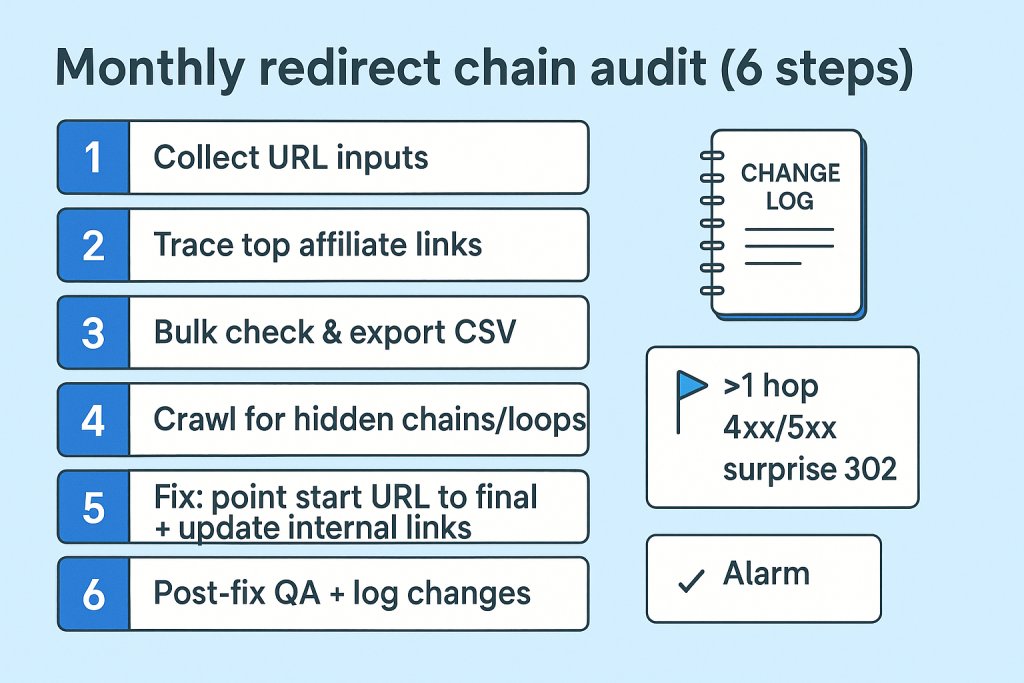
Workflow: a boring-but-effective redirect chain audit you can repeat monthly
Monthly redirect chain audit (6 steps):
-
Collect URL inputs
Top landing pages, top money pages, and legacy URLs still used in partner links. -
Discover chains
Crawl the site (Screaming Frog) to surface redirect chains/loops at scale. -
Export redirect reports
Use Screaming Frog’s redirect reporting so you can sort/filter in one sheet (Screaming Frog tutorial). -
Prioritize by impact
Money pages → high-traffic pages → high-backlink pages. -
Sense-check samples
Validate batches of 50–100 URLs with httpstatus.io (httpstatus.io). -
Log changes
Keep a change log: what changed, when, and what happened next. Otherwise you’re just telling yourself stories.
Screaming Frog (migration-style) setup: List Mode + ‘Always Follow Redirects’
Fast setup from Screaming Frog’s migration audit process:
- Switch to List Mode and upload the old URLs you want to audit (Screaming Frog tutorial).
- In Spider Configuration (Advanced tab), enable “Always Follow Redirects” (Screaming Frog tutorial).
- Start the crawl.
- Export Reports → “All Redirects” (Screaming Frog tutorial).
Columns that matter:
- Number of Redirects
- Redirect Loop
- Final Address + Final Status Code
- Indexability
Fixing chains without breaking tracking (and how to prove you didn’t)
The core fix is almost always the same: remove the middle hops.
Conductor’s recommendation is blunt: ensure there’s just one redirect from the starting URL straight to the final target (Conductor). So instead of A → B → C, make it A → C.
Second fix people forget: update internal links that still point at redirected URLs. If your nav/footer/modules still link to A, you’re forcing every user through the chain.
On 301 vs 302: 301 is permanent, 302 is temporary (valid for maintenance or A/B testing) (Adido Digital). Context matters.
Affiliate-specific caution: if your tracking flow depends on a network hop, don’t “optimize” it away blindly. Trim your unnecessary hops first, then retest the full click path.
Post-fix QA checklist:
- Final destination returns 200.
- Chain is ≤ 1 hop where possible.
- No loops.
- Re-test in bulk (httpstatus.io) and spot-check key affiliate links (WhereGoes).
- If behavior differs by device/bot, test user agents (redirect-checker.org).