Affiliate Link Tracking Best Practices: UTMs, SubIDs & S2S Proof
Operators often open three tabs and wonder why nothing agrees. Networks and GA4 rarely agree on the same conversion count, because one measures commission-eligible actions and the other measures behavioral events. The tracker sits somewhere in between. Someone decides to install another plugin to fix the discrepancy. That is the wrong first move, and it is not a matter of finding a better list of affiliate link tracking best practices. The fix is not another tool. The fix is naming which ledger wins for payout versus behavior.
When the postback tile is green but commissions still will not reconcile, use the S2S postback failure map.
The fantasy of a single clean dashboard dies hard. I am skeptical of it. A common failure mode is treating three different systems as if they measure the same thing. They do not. Each system reads a different slice of the journey. Before you tag another link, you have to decide which slice owns trust.
UTMs explain marketing. SubIDs explain money. Pick your ledger before you pick your software.
Failed assumption: three dashboards should agree without picking a ledger
The mistake starts with a bad assumption. You open the network UI, GA4, and maybe a tracker. You expect them to reconcile because they all report “conversions.” They will not. A network credits a sale when its tracking pixel or postback fires. GA4 credits a session using a different attribution model entirely. The tracker sits in the middle, counting events you decided to send it.
Operators often react by adding another integration. That is buying software before naming the job. I recommend resisting that impulse. If GA4 and the network disagree, you probably have not named the primary ledger. That single naming decision resolves more tracking pain than any tool.
Think of it as a simple split. The network platform report is the commission truth. GA4 is the behavioral snapshot. The tracker is a routing layer, not a ledger of record unless you own the redirect and postback job end to end. None of these are wrong. They are built for different questions. Trying to force them into the same number produces exactly the mess you are looking at.
A network’s click report will also include bot clicks that GA4 never sees. GA4 filters known bots automatically, but the network logs every click that hits its tracking link. GA4’s built-in bot filter catches known bots (operator summaries often point at the IAB/ABC list; one vendor write-up of that floor), while the network click counter does not know whether a click came from a human. When the network shows far more clicks than GA4, part of that gap is bot noise, not lost conversions. That is not an attribution problem. That is just noise you will see in the network UI.

The chain: click -> ID stored -> conversion matched
Every affiliate tracking link works through three steps. The click generates an ID. The system stores that ID somewhere. A later conversion is matched back to the stored ID. Step one is usually fine. Step three happens on a server somewhere. Step two is where affiliate tracking breaks. Cookie loss, redirect strips, consent refusals, and cross-device jumps all sit in that middle step.
There are two failure modes in step two. Client-side decoration stores the ID in the browser, usually in a cookie or a URL string. Server-side persistence stores the ID on your server or the network’s server and returns it at conversion time. Client-side is faster to set up and much easier to lose. If the click ID was lost in the redirect chain, there is nothing to stitch back together. That is a structural statement, not a war story.
Consider a structural scenario. A user clicks an affiliate link on mobile. The link passes through a shortener, then a network redirect, then a landing page with a fourth redirect. Somewhere in that chain, a 302 drops the query string. The client-side ID never lands. The user converts anyway. The network shows a conversion, but your tracking layer shows nothing. You did not lose the sale. You lost the proof of where it came from.
This is not rare. Redirect chains, ad blockers, and privacy filters can strip client-side parameters at multiple points before the dashboard. Exact loss varies by funnel and audience, so treat any aggregate figure as a benchmark, not your number. The fix is not to accept the loss. The fix is to carry the ID through the chain server-side or to capture it before the first redirect can touch it.

Two layers: UTM (analytics) vs SubID (payout reporting)
UTMs are analytics decoration. They tell GA4 where a session came from and what campaign it belongs to. They live in the URL, visible to the browser and the analytics script. That visibility is their weakness. Safari strips known click IDs in private browsing. CDN regex rules filter the utm_ prefix at the edge. Ad blockers block the analytics script that would read the parameters. A UTM that never reaches the analytics call is just a string that did not matter.
SubIDs work differently. They are metadata you pass into the affiliate network or tracker. The network stores the SubID server-side and returns it in conversion reports or postbacks. When implemented correctly, a SubID survives the redirect chain because your redirect server persists it forward. It does not rely on the browser to report anything. It rides along inside the network’s own tracking layer.
The split is clean. UTMs explain marketing. SubIDs explain money. If you want to know which article earned the commission, the network’s SubID report answers that. If you want to know which traffic source sent the visitor to that article in the first place, UTM data in your own analytics answers that. Both layers can coexist on one link. The advertiser’s analytics reads the UTMs. The network reads the SubID. Neither interferes.
One caution on combined links. Parameter order and network-specific names matter. Impact uses subId1. CJ uses SID. Awin uses clickref for the click-level SubID slot (current conversion tags report currency via currencyCode, not a legacy cr token). If you append the wrong parameter name, the network silently drops your SubID and you get a blank column. I am not going to rebuild those parameter tables here. The SubID tracking guide has them, and the blank-column diagnostic handles the failure path.
A short paid-affiliate example helps. If you run Google Ads to a pre-sell page and then to an affiliate offer, you can pass the gclid through a SubID. The network stores it. When the conversion postback returns the gclid, you upload it as an offline conversion into Google Ads - and as of 15 June 2026 that upload path is Data Manager, not the blocked Google Ads API offline-import route. The algorithm then optimizes on actual affiliate sales, not just link clicks. For silent filters after a “clean” upload, use the offline conversion filters guide. The same SubID pattern works for Meta click IDs. It takes one SubID slot and a working postback.

Pick your primary source of truth (before you tag another link)
One dashboard is a fantasy. Named ledgers are the discipline. This is where I get contrarian because the industry loves the fantasy of a single clean view. Before you tag another link, write down which system owns which answer.
The network platform report owns commission truth. It decides whether you get paid and how much. It is not an analytics tool. It is a payout ledger. TUNE put this bluntly: Google Analytics is not affiliate tracking software. Affiliate tracking software exists to manage partners, payouts, and conversion records. GA4 exists to report on-site behavior. Treating GA4 as the commission ledger creates gaps operators try to “fix” with more plugins, when the network report already owns payout truth.
GA4 owns behavioral truth. It shows sessions, pages, and channel mix. It does not issue affiliate commission. It does not know which network paid you. It should never be the system you use to check whether a commission is missing. Use it for funnel behavior and audience signals.
A tracker or aggregator owns routing truth only when you control the redirect and postback job. If you run paid traffic through your own redirect domain and pass SubIDs forward, the tracker becomes the join layer between click IDs and conversion postbacks. If you do not control that job, the tracker is just a second opinion.
Reconciliation uses the SubID as the join key. Export rows from the network. Export rows from GA4 or your tracker. Match on SubID value, not on aggregate totals. Timezone differences and validation delay explain most “GA4 is wrong” panic. The network might validate a lead three days after the click. GA4 logs the session the same day. The numbers will not match until you align the time window. That is a data hygiene problem, not a tool failure. Consent mode adds another layer: GA4 models conversions for users who refuse tracking, and modeled numbers are less precise than observed ones.
Do not rebuild the tracker scoreboard here. The tool-class fit tests and the platform comparison cover that decision. What matters now is naming the ledger first.

When to add server-side / consent-resilient proof
When the job is specifically affiliate postback S2S (not the full UTM/SubID stack), use the S2S tracking guide for handshake and first-verify, then return here for ledger choice across layers.
Server-side proof is not magic. It is a layer that survives when client-side cookies lie. The decision to add it is not about buying a specific logo. It is about whether your only proof currently depends on the browser.
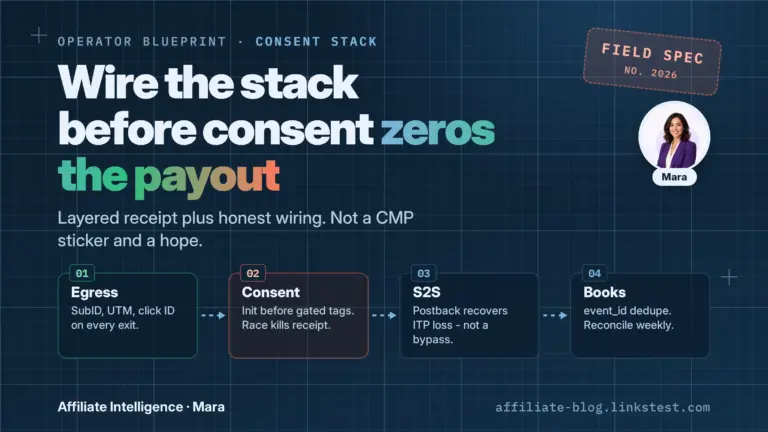
Use this short decision tree. If your client-side pixel is the only proof and cookies or consent are messy, you need server-side or consent-resilient proof. If consent mode or a CMP is already blocking a meaningful share of events, your number is understated. If redirects or ad blockers are eating client-side parameters before they land, the same gap applies. The consent-resilient stack guide maps the full answer.
Here is the structural scenario that matters. A network receives your SubID on click. You set up a postback. The network stores the click ID server-side. When a conversion fires, the network sends a postback to your endpoint with that click ID. Your server matches it and records the conversion. That loop works regardless of what the browser did after the initial click. Server-to-server tracking removes the browser from the attribution path, which makes it more reliable than client-side; exact accuracy varies by setup, so do not chase a universal percentage.
But the postback must return your parameter. If the network does not echo your SubID in the conversion payload, your server gets a click ID with no label. You see a conversion but cannot segment it. That is a network configuration issue, not a software purchase. Verify the raw postback request. If the SubID field is blank, fix the mapping before buying anything else.
Do not turn this into a tracker shopping list. The tool-class decision lives in the match-tool-to-job guide. The honest limits of first-party IDs and what they actually fix live in the cookieless attribution piece. Read those if you are asking whether cookieless is “enough.” Here, the point is narrower: add server-side proof when cookies are the weak link, not because a brochure says so.
Affiliate link tracking audit trail
The best tracking setup fails silently without an audit trail. A common failure mode is renaming a tag, swapping a redirect, or migrating networks, then losing the ability to explain last month’s data. Silent failures show up later as blank columns, so log every SubID mapping, redirect change, postback change, and parameter name change with a date and owner.
Log every tag rename and every redirect swap. When you change utm_campaign from “summer_sale” to “summer-sale,” write it down. When you move from one redirect domain to another, write that down too. Historical reporting depends on knowing what the old names meant. Mistakes in UTM parameters are permanent once the traffic flows. The same applies to SubID taxonomy.
Spot-check one live link after any network migration. Do not assume the migration preserved your parameters. Click the link yourself. Watch the redirect chain. Confirm the SubID survives every hop. If the SubID column is blank post-live, troubleshoot the path before you panic. The blank-column diagnostic walks through parameter mismatch, network-side gaps, and redirect failures.
For email as a channel, only pull in the email-specific SubID ops when the ESP wrap is the recurring pain. That is a distinct setup question from standard link tracking.
Light touch on silent failures. If links are dying in redirect chains or breaking without warning, redirect chain detection and link rot silent failures cover the diagnostics. Do not rebuild those here. Just know that an audit trail includes checking for silent failures, not just checking for dashboard discrepancies.
Affiliate link tracking checklist
The checklist below is the one-sitting version. If boxes are checked and logged, the tracking stack is at least explainable.
Affiliate link tracking checklist
- ☐ Name the affiliate network report as the payout ledger.
- ☐ Map SubID to the network’s exact field before launch.
- ☐ Test the full redirect chain and confirm the SubID survives.
- ☐ Verify the raw postback echoes the SubID.
- ☐ Align time zones and validation windows before comparing dashboards.
- ☐ Log every redirect, postback, or SubID mapping change.
FAQ
Does cookieless tracking replace SubIDs? No. Server-side holds most of the value, but it is not a universal fix. Read the cookieless limits guide before treating it as one.
When should I use email-specific SubIDs? Only when the ESP wrap is the recurring pain, because it is a distinct setup. Email SubID ops cover that case.
Where are the network parameter names? The SubID tracking guide has the tables. Wrong parameter names silently drop the column.