Subid Tracking Not Showing Up? How to Diagnose It
Prerequisites
Goal: collect materials and define one labeled test click before touching live volume.
Before treating a blank SubID column as a finding, confirm what you sent had somewhere to land. Four materials matter: the network click or report UI, the program’s live help docs, a timestamped notes file for evidence, and one low-risk placement. The notes file matters because a blank column is evidence, not mood. Write down what you appended, when you clicked, what the final URL resolved to, and what the report showed at that timestamp.
Pick an ASCII label now. No spaces, no symbols, nothing that depends on URL encoding:
LABEL="subtest-20260904-placement"That label is the control. It should appear unchanged in every URL, log line, and screenshot. If it never appears in the report, the problem is structural, not statistical. A single known value lets you compare the builder URL, the hand-appended URL, the raw redirect chain, and the final landing URL without ambiguity. A random campaign label cannot do that.
Use the same label across every layer. If the network report fills with one URL and stays blank for another, the label tells you which path into the link worked. That is the difference between “the column is empty” and “the column is empty for this specific append method.”
Checkpoint: materials ready, one low-risk placement chosen, one ASCII label saved, and the notes file opened with a timestamped entry.
The Failed Assumption
Goal: drop the idea that a 200 redirect or a firing click means your SubID landed.
Operators append a guessed parameter, watch the click fire, and assume the column will fill. That assumption is the first failure. A redirect or HTTP 200 is a delivery receipt, not an attribution receipt: the network accepted the click, not necessarily the label. The green tick is not tokens matched piece covers this gap in detail.
Run this after your test click:
curl -sIL "https://your-affiliate-link.example" | grep -Ei '^(HTTP|location)'A clean chain prints a few HTTP lines and a final Location. It proves the link resolved. It does not prove the network stored your SubID in the report column. The blank column is a path failure, not a verdict. For the full naming architecture, read the SubID tracking guide rather than rebuilding it here. The server-side tracking guide explains why UTMs and SubIDs answer different questions.
Structural scenario: a user clicks a mobile affiliate link. A shortener, a network redirect, and a landing page with a fourth hop all fire. Somewhere in that chain a 302 drops the query string. The user converts. The network records a conversion, but your SubID column stays blank. You lost the proof, not the sale.
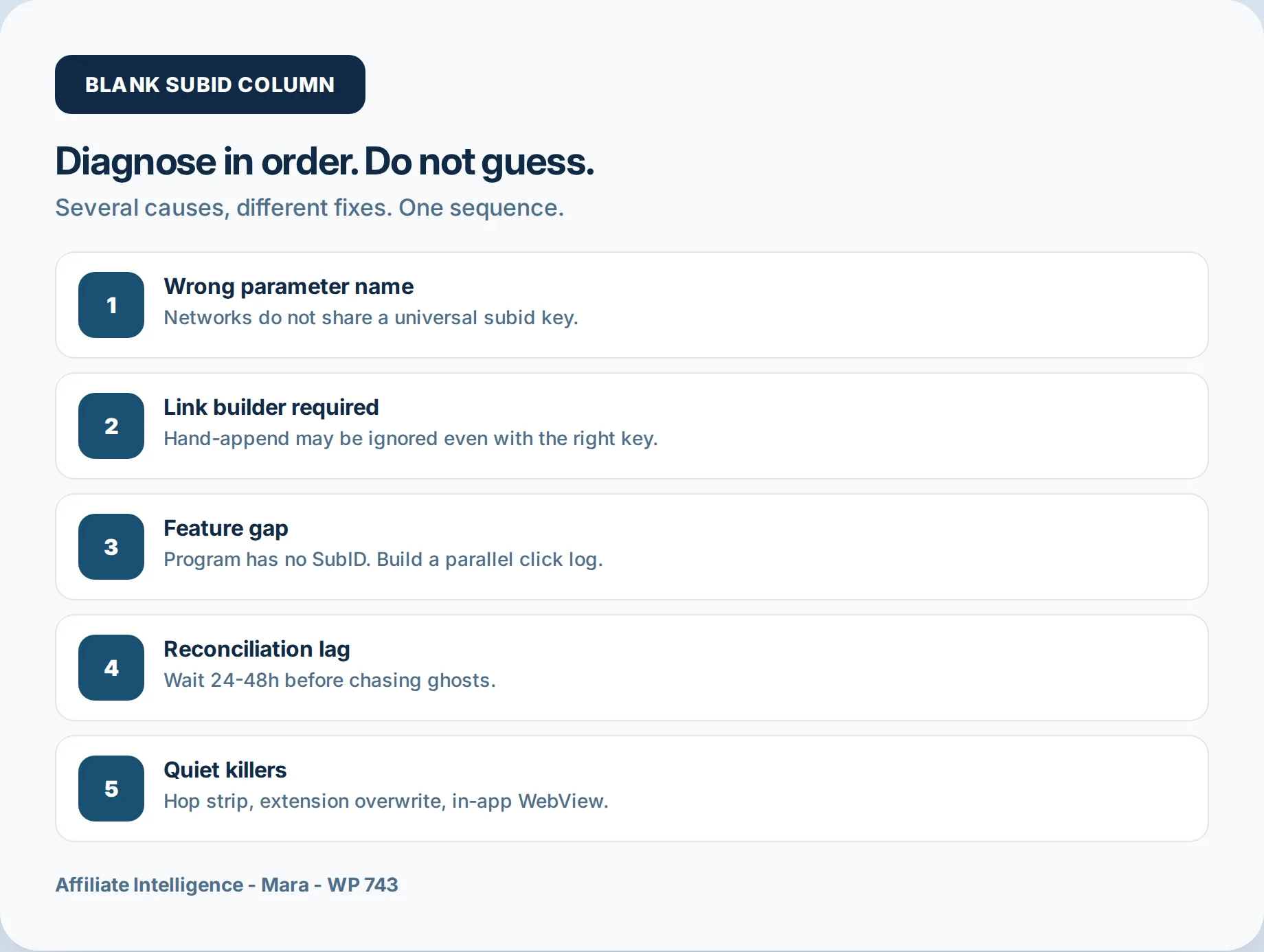
The blank column can come from several distinct places: a redirect strip, an extension overwrite, a WebView drop, a wrong key that the parser ignores, a builder-only flow, no SubID echo from the program, reporting lag, or a token mismatch between the URL key and the report column. If the missing signal appears beyond SubID reporting, use the broader funnel drop diagnostic checklist.
Checkpoint: reframe the blank column as a checkpoint sequence. Do not change offers yet.
When Clicks Fire but SubID Still Blank
The goal is to map the blank column to a branch before you spend another click budget guessing. Six branches cover most cases:
- ☐ Redirect, extension, or WebView strip: the query string disappears mid-chain, at checkout, or inside an in-app browser.
- ☐ Wrong key silent discard: the network parser reads its documented slot and ignores the rest.
- ☐ Builder-only flow: the program stores SubIDs only when the link is generated inside its own tool.
- ☐ No SubID echo: the program records a click but never returns your label to reporting.
- ☐ Reporting lag: the click was accepted, but the report has not caught up to the program’s window.
- ☐ Token map mismatch: the URL key, postback macro, and report column do not point at the same field.
Take the same ASCII label through the full path once. The branch it lands in tells you which section to expand, and no amount of report refresh resolves the wrong key or a stripped query string.
Wrong Network Parameter Name (Silent Discard)
Goal: confirm the exact documented key for this program before doing anything else.
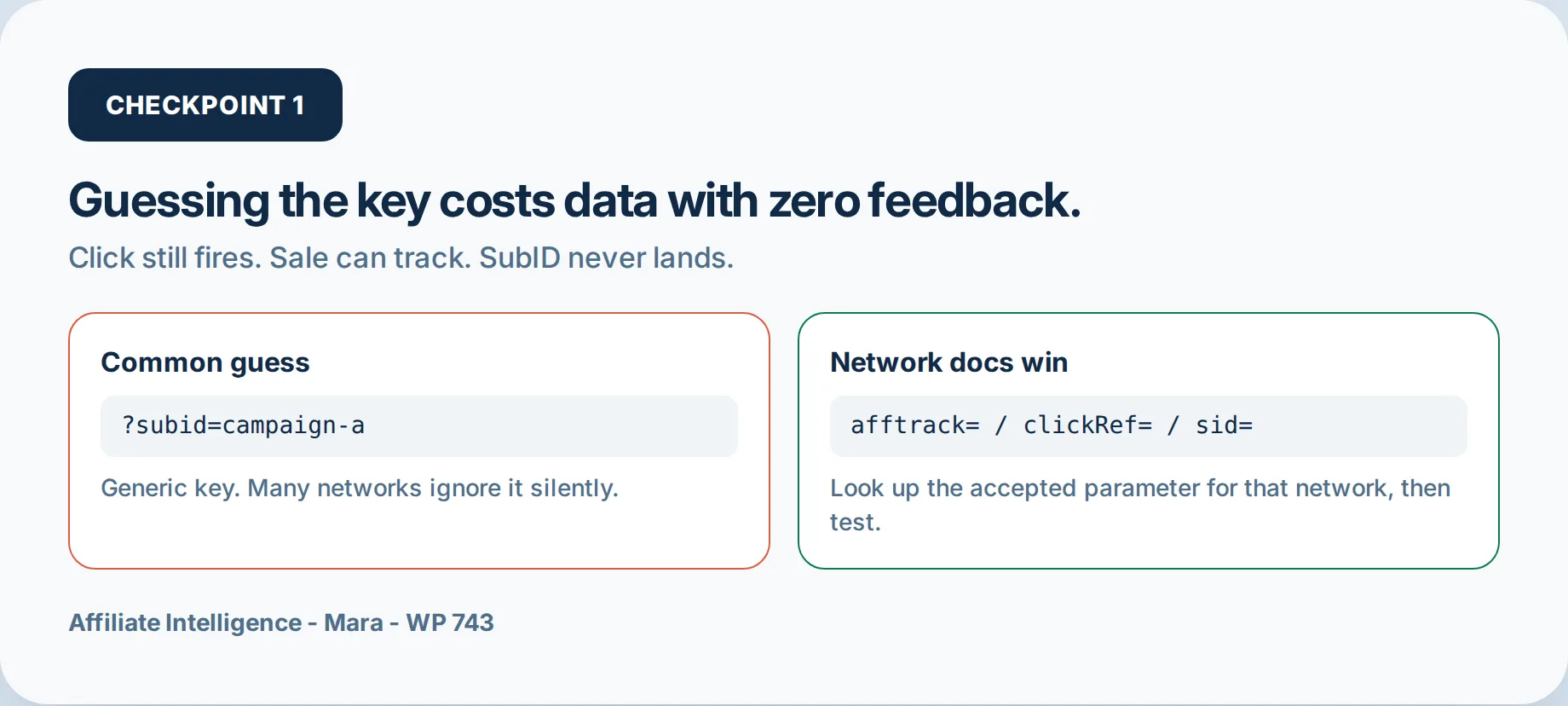
Keys differ by network and program class. afftrack, clickRef, sid, sub1, aff_sub, and u1 are examples of the pattern, not a universal scoreboard. The Admitad documentation, as of 2026, explains how subid through subid4 flow into reporting and how each field has limits. Plans and docs change, so open the live help page for the program you are running Admitad help center.
Wrong key means silent discard. No 4xx, no warning, no error toast. The network parser reads its documented slot and ignores the rest. Match the network’s documented key or the report stays blank.
Example, using class-level names only:
# Wrong if the network expects clickRef:
https://track.example.net/click?aff_id=123&subid=subtest-20260904

# Correct:
https://track.example.net/click?aff_id=123&clickRef=subtest-20260904
The report column has no reason to fill when the value lands in a field the network does not map. That is why the fix is documentation, not repetition.
Checkpoint: exact documented key copied into your notes file; one test URL built with that key only.
Find the Key in the Program Docs
Do not trust memory when a program changes parameter names. Search the program’s own help docs for SubID, tracking parameter, customid, ctc, fobs, epi, and pubref. These are common field names, not guarantees. Capture the exact spelling, capitalization, and character limit for the slot you intend to use.
Save the URL of the live documentation page and a screenshot with the date visible. If the program later changes its key, your evidence shows what the documentation said on the day you ran the test. That distinction matters when an affiliate manager replies that the field was renamed or the plan changed.
Check the program’s change log or release notes if the help page does not match the current dashboard. The goal is to find the documented key for the program and the report column it feeds, not the most common key across the industry.
Link Builder / Deeplink Requirement vs Hand-Append
Goal: prove whether the program requires its own link generator.
Hand-append is a privilege, not a default. Many programs only honor SubIDs created through their link builder or deeplink tool. A hand-append can keep the click alive and still blank the report. The Admitad help page separates three methods: deeplink section, deeplink generator, and manual append. The first two exist because some placements only flow through the program’s field.
Run a builder URL and a hand-append URL side by side:
# Builder URL (documented field):
https://track.example.net/click?offer_id=123&aff_id=456&clickRef=subtest-20260904-builder

# Hand-append URL (same key, manually placed):
https://track.example.net/click?offer_id=123&aff_id=456&clickRef=subtest-20260904-hand
Same key, same label, different path into the link. If the builder URL returns a SubID and the hand-append stays blank, the program requires the builder. That distinction is evidence you cannot get from a dashboard stare.
Builder tools often URL-encode the destination, place the parameter in the program’s expected position, or attach the label to a deeplink token that manual append never touches. You see the difference only when both URLs use the same ASCII label.
Checkpoint: builder requirement confirmed or ruled out; the correct link path is saved.
Feature Gap + Parallel First-Party Click Log
Goal: handle programs that never echo SubIDs, without pretending the network report will change.
Some programs do not support SubID echo at all. They may record a click but never return your label. Others use their own tracking IDs or tags instead. Clicks show, SubID blank, and no parameter spelling fixes it.
The structural workaround: log the click on a property you control. A minimal owned hop looks like this:
https://yourdomain.com/go/?c=TOP-BANNER&target=Your server records the timestamp and c value, then issues a 302 to the affiliate URL. The network cookie still fires, but your log keeps the placement label the network will not return.
Example log line:
2026-09-04T14:03:01Z c=TOP-BANNER target=https%3A%2F%2Ftrack.example.net...Be honest about the reconciliation boundary: this log shows what you sent. It cannot force the network report to include a SubID. You get first-party proof, not program-level segmentation. If you are shopping infrastructure, the tracker product comparison helps; otherwise skip the tool browse.
The network controls its own columns. You control the redirect in front of it. Capturing the label before the network receives the click preserves segmentation even when the program gives you nothing back.
Checkpoint: fallback log running or explicitly rejected; the boundary between your log and network report is written down.
Reconciliation Lag and Token Match
Goal: wait the program’s documented reporting window, then verify every token layer matches.
Delay and token maps are different ledgers. One is time, the other is naming. After a correct test click, wait the program’s reporting window before escalating. Google Ads offline conversions can take three hours or longer, and Google’s documentation notes that processing typically takes less than 12 hours but can reach 72 hours when GBRAID or WBRAID-keyed conversions are involved Google Ads conversion processing. GA4 can lag up to 24 hours. Some affiliate platforms treat 48 hours as a conversion deadline. Use the program’s own help doc as the source, not a universal average.
Separately, three strings must match: the URL key, the postback token map, and the report column.
URL key:     clickRef=subtest-20260904
postback:    {clickRef} or the network's mapped macro
report col:  clickRef / SubID1
A mismatch looks exactly like a blank SubID. The raw postback may arrive, the server may return 200, and the label may be absent because the macro was written cid={click_id} when the network expected cid={clickRef}. The green tick is not tokens matched piece covers those illusions in full.
Each layer references a different name for the same idea. If any layer points at the wrong key, the value never lands in the column you are reading.
Checkpoint: waited the full documented window; key, token, and column aligned in one row.
Quiet Killers: Redirects, Extensions, WebView
Goal: find the hop where the query string disappears before you blame the report.
Multi-hop redirects, coupon or browser extensions, and in-app WebViews can strip query strings. Each is a quiet killer because the click still fires.
Inspect the chain directly:
curl -sIL "https://your-affiliate-link.example" | grep -Ei '^(HTTP|location)'Read the lines top to bottom. The first hop where the ? and all parameters disappear is your strip point. The redirect-chain hop tooling and the hop leakage audit walk the full tooling path.
Extensions are the other path. A coupon extension can load its own affiliate tag at checkout, overwrite last-click, and push your clean SubID out of the credit window. Awin’s documentation explains that Soft Click lower-funnel partners cannot override cookies from influencers or content partners, and commission is allocated toward the non-Soft Click partner when present Awin Soft Click attribution. The extension overwrite piece maps that dynamic.
In-app WebViews can also drop query parameters, especially when an app-store redirect preserves only the path or fragment. Deep link documentation often recommends encoding affiliate parameters in the path, not only in query strings, so the identifier survives the app-store hop.
Checkpoint: hop-level plan written; one private-window, extension-free retest scheduled.
Evidence Kit + One Real Test-Click Protocol
Goal: prove append before volume, with a timestamped packet your affiliate manager can read.
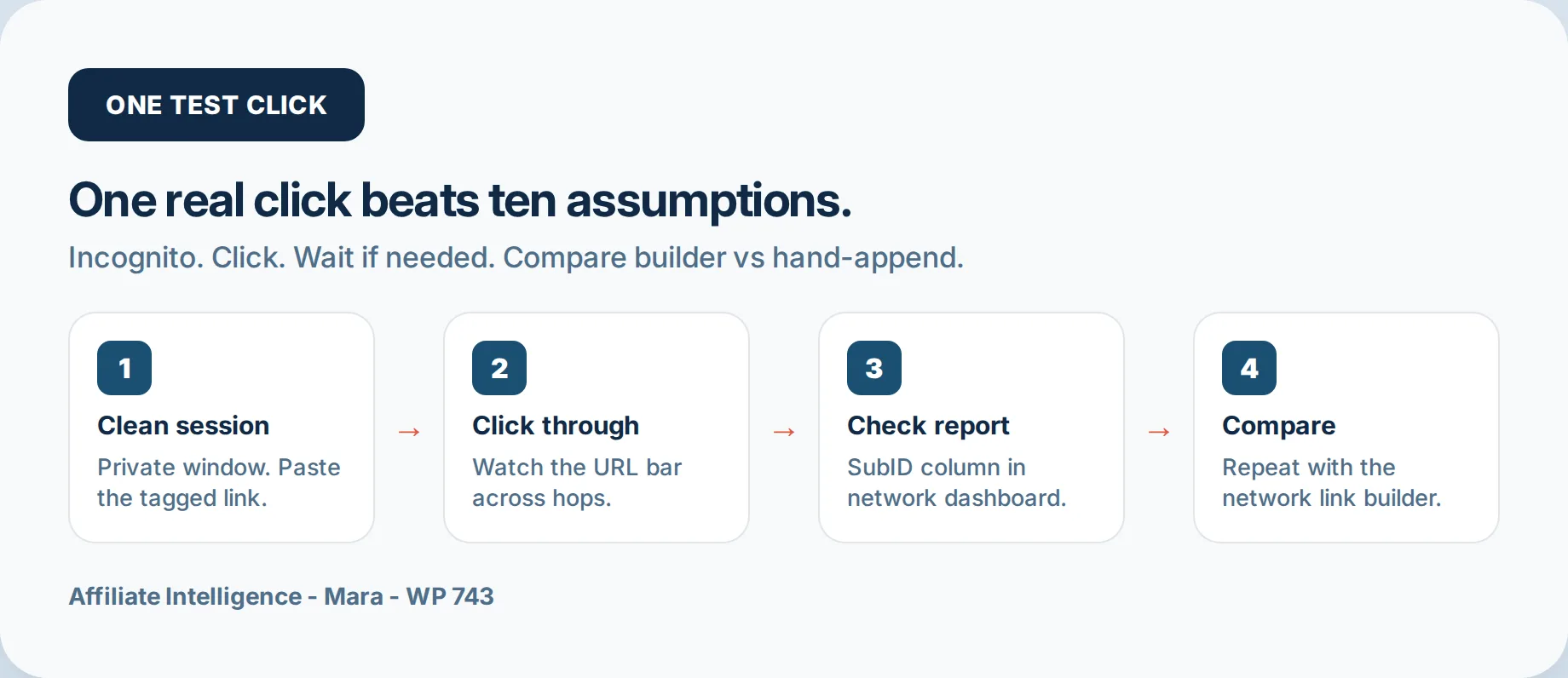
One labeled ASCII test click beats a week of dashboard staring. Do not send more traffic until this kit exists:
key:            clickRef
builder_url:    https://track.example.net/click?...clickRef=subtest-20260904-builder
hand_url:       https://track.example.net/click?...clickRef=subtest-20260904-hand
timestamp:      2026-09-04T14:03:01Z
landing_final:
report_shot:
click_id:
conversion_id:
Run one real test click through the low-risk placement. Save the final landing URL, the report screenshot, and your own redirect log. If the column is blank, you have a document to hand an affiliate manager, not a vague ticket.
Escalation questions, in order: What is the documented SubID key for this program? Do you honor hand-appended parameters, or only builder-generated links? Does your raw postback echo SubIDs? Which report column should my test value appear in, and what is the reporting window? If you have a library of links to audit, run a bulk pre-launch audit checklist before assuming one broken link represents all of them.
A timestamped packet separates infrastructure failure from optimization fiction. It also turns manager replies into actionable data instead of reassurance.
Before you send more traffic next week, answer these questions in the evidence file:
- ☐ Which hop dropped the parameter?
- ☐ Which exact key does the program document?
- ☐ Does the builder URL report the label when the hand-append does not?
- ☐ What does the raw postback show?
FAQ: What to Ask Before You Send More Traffic
Does Amazon Associates support SubIDs? No. Amazon-class programs generally use Tracking IDs (or tags) assigned per site, section, or campaign instead of a classic SubID column. Diagnose the right object: a blank SubID on Amazon is usually a category mismatch, not a broken append. Do not rebuild an Amazon encyclopedia here; if your report never offered a SubID field, you are looking at the wrong label.
Clicks show but SubID stays blank - what is the first thing to check? Open the six-branch checklist in When Clicks Fire but SubID Still Blank and run wrong key, builder vs hand-append, feature gap, lag, strip, and token match in that order before blaming the network.
When should I stop troubleshooting and change the program or architecture? Stop when a controlled test click on the builder URL, with the documented key and matching tokens, still leaves the report blank after the program’s documented reconciliation window. At that point change the architecture or the program, not the funnel.
If the last three are silent while the first two are correct, change the architecture or the program, not the funnel.