Affiliate Domain Resilience Playbook: Prevent Your Domain SPOF
If you arrived here from do-I-need-a-website searches, the beginner start map covers the week-one pipe and the destination-honesty decision - then come back for the full SPOF playbook.
The Failed Assumption: You Are Obsessing Over the Wrong Risk
Most affiliate operators spend too much time worrying about commission cuts and not enough time securing the hostname that carries every affiliate link. Industry energy goes toward merchant concentration, rate changes, platform volatility. Meanwhile the domain sits unlocked, the recovery email lives on the same domain, and auto-renew is a promise held together by a single credit card that expires next month. An unlocked registrar account is softer infrastructure than any commission structure. Soft money in the forecast isn’t the only soft asset.
If the domain or the registrar account dies, every link, every SubID story, every ranking signal attached to that host is at risk - even if the content still exists on a server somewhere. This is not a commission-cut problem. That essay lives at affiliate revenue concentration risk management. It’s also not a question of entity structure, though an LLC does not replace registrar locks (see the liability trap without an LLC). This is the pipe itself. And most publishers treat it as hosting-plus-WordPress, not as the revenue-critical infrastructure it is.

What Domain SPOF Actually Means (Scope of This Hub)
The domain is not just a name. It’s the foundation for your affiliate links, email deliverability, and the trust signals that search engines and users attach to your property - turning that hostname into an affiliate domain single point of failure if the stack unravels. The happy-path layers: your registrar account, then the domain locks, then DNS resolution, then the recovery email that gates access to all of it, then the second factors that protect the login, then ownership and admin controls, then renewal billing. Any one of these breaks, and the revenue pipe goes dry.
This hub gives you a pre-incident resilience playbook. It does not cover full post-hijack incident response or UDRP process - if the domain has already transferred out, that lives in the platform rug-pull incident response (contact your registrar immediately with proof of ownership; the IR satellite is stabilization after the pipe already moved). It does not price platform risk into your revenue forecast - that lives in the platform-risk line item essay, which plugs into the forecasting model. And it won’t scoreboard registrars or tell you which DNS provider is “best.”
When the pipe dying meets program economics dying, you have a compound failure. And if your payout path also sits on fragile infrastructure, you’re compounding further (money movement risk). This hub isolates the domain layer so you harden it now.

The Failure-Mode Map: Eight Ways the Pipe Breaks
Recovery Email on the Same Domain
If the only recovery mailbox lives at the domain that just transferred out, you cannot reset the registrar account. A common failure: the WHOIS admin contact is [email protected], the domain expires or gets hijacked, the mailbox stops working, and the reset email goes into a void. No password reset, no lock removal, no ownership proof.
Equally dangerous: a sister domain that serves as the recovery email host also expires because nobody remembered to renew it. Off-domain recovery is non-negotiable. Use an email address on a separate, actively managed domain or on a provider with strong account controls. While you’re at it, set an alias or forward that doesn’t dump a personal inbox into public WHOIS forever.
SMS or Phone 2FA as the Only Factor
SIM-swap and provider phone-push coercion make SMS a weak primary factor for a registrar account. If an attacker convinces your mobile carrier to port your number, they can receive the 2FA code and take over. Prefer an authenticator app. Better yet, a hardware security key that uses the FIDO2 standard, which isolates private keys and is phishing-resistant. Vault backup codes offline or in a separate password manager from your primary vault - never in the same password manager that holds the login.
Auto-Renew Plus a Single Dying Card
Auto-renew is a promise, not a guarantee. Cards expire, banks decline international charges, credit limits get hit. When that single payment method fails, the domain enters a grace period and you might not notice until the website goes dark. The fix: add a second payment method, keep a prepaid balance if your registrar offers account funds, and set calendar reminders 60 days and 30 days before expiry. Some registrars will retry auto-renew for a few days; others won’t. Assume they won’t.
The Departed Admin Still Owns the Keys
If the only login to the registrar account belongs to a person who no longer works with you, you are hostage to their goodwill. Ownership must sit under business-controlled role emails ([email protected]), not personal addresses. Revoke registrar, DNS, and email access for anyone who departs, and audit all shared credentials they had.
One Vendor Stack: Registrar + DNS + Mail
When a single provider manages your domain registration, DNS hosting, and email hosting, one breach or account lockout can take everything. Separate registrar from DNS from email hosting so the blast radius shrinks. If your DNS provider goes down or your account gets suspended, you can still change nameservers at the registrar to point elsewhere. That’s impossible if the same company controls both.
Transfer Lock and the 60-Day Trap
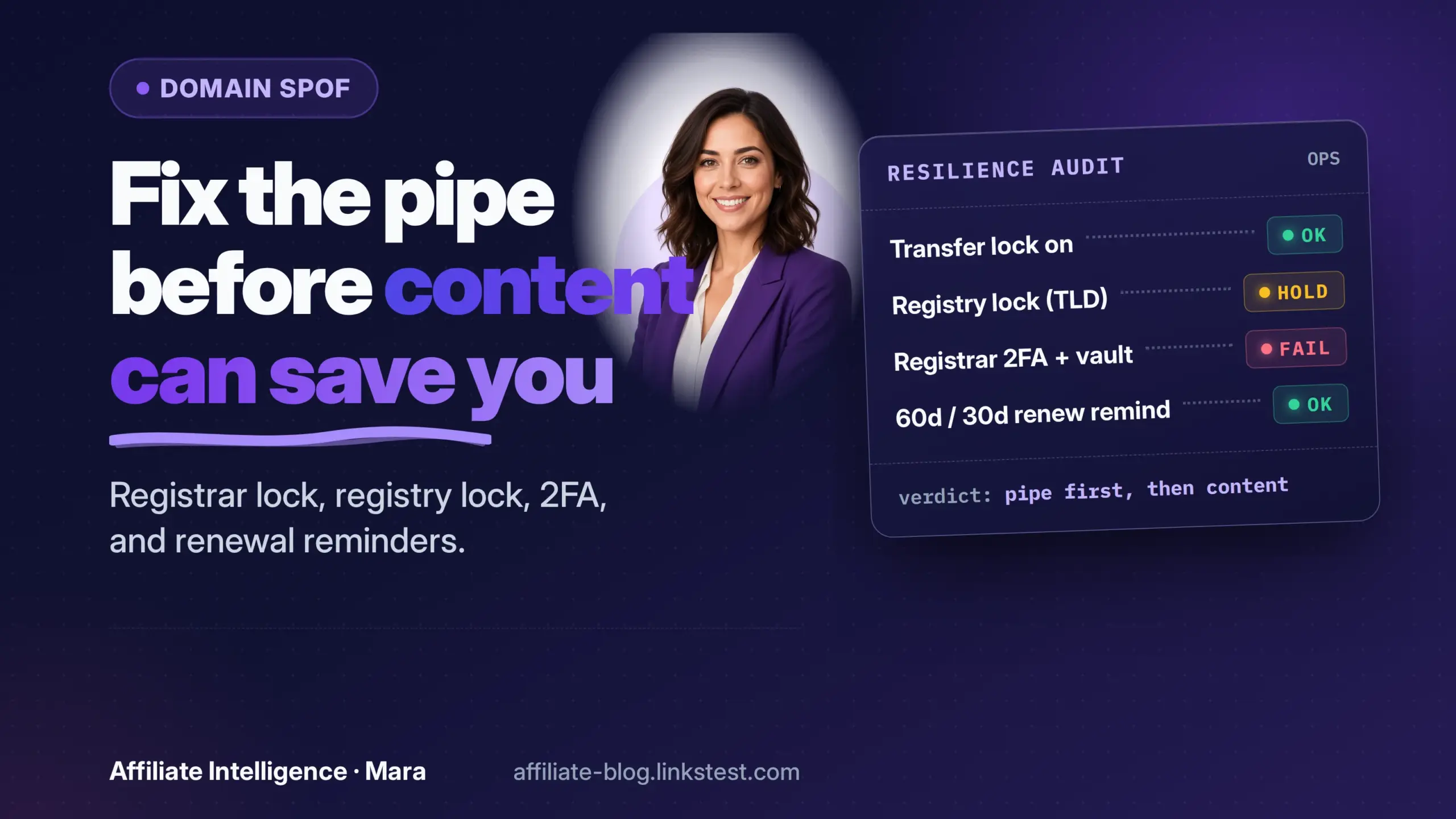
There are two distinct locks. The registrar-lock (also called clientTransferProhibited) prevents domain transfers but does not prevent changes to nameservers. The registry lock (serverTransferProhibited and related statuses) prevents all changes at the registry level and requires out-of-band verification. Think of registry lock as requiring a phone call or multi-party approval before any modification - it’s the safer option for high-value domains, but it’s not available on every TLD and adds friction for legitimate changes. Confirm availability with your registrar.
Plan around the ICANN-class 60-day transfer lock: after any change of registrant name, organization, or email address, a new 60-day lock can apply (ICANN Transfer Policy, FAQ).
Transfer hygiene: unlock the domain, confirm you can receive email at the listed administrative address, disable privacy only temporarily if required, and complete the transfer in minutes, not days. Don’t leave the domain unlocked for days; someone monitoring WHOIS could see it and act.
WHOIS Privacy: The Sharp Tradeoff
WHOIS privacy is not a binary religion. It reduces spam and shields personal data, but it can block transfer confirmation emails if the privacy service does not forward them correctly. It can also complicate ownership proof after theft - if the records show a proxy service, proving you are the real registrant becomes harder.
The practical move: use an alias or forward so you can receive confirmation emails without exposing your primary inbox, test the forward this week, and understand that privacy may need to come off briefly during a transfer. Expose it for minutes, not days.
Generic Domain Admin Contacts Flagged by Registries
Registries that perceive a contact as generic - “Domain Admin” or an org-only listing without a named human - can suspend the domain under ICANN’s verification policies. ICANN requires confirmation of contact information within 15 days of certain changes, and failure can lead to suspension (Registration Data Reminder Policy FAQ). Ensure your registrant, admin, and tech contacts include a verifiable human name alongside a role email that your business controls. “Admin Department” plus a working email is safer than a generic label that trips automated checks.

The One-Sitting Resilience Audit
Locks, Renewals, and a Second Payment Path
Open your registrar dashboard right now. Confirm the transfer lock (clientTransferProhibited) is ON. Check whether your TLD supports registry lock - ask your registrar what it costs and whether it’s worth the operational delay for your domain. If you rely on auto-renew, verify a second payment method is on file and active.
Set a recurring calendar reminder 60 days and 30 days before expiry. If your registrar allows account funds or prepaid balance, maintain enough to cover at least two years, insulating you from card-decline failures. Note that some registrars block transfers near the maximum registration term; confirm with your TLD’s rules.
Login Factors and Backup Codes
Give the registrar account a unique, strong password stored in a password manager that is not shared with your primary email or other accounts. Enable an authenticator app or a hardware security key. Do not use SMS as the primary factor. Export the backup codes and store them offline in a separate, encrypted container or a second password vault that doesn’t sync with your primary. If you lose your phone and your vault at the same time, those codes are your fallback.
Recovery Email Off-Domain (Test It This Week)
Open WHOIS or your registrar’s contact page. The email listed for recovery must not be @yourproductiondomain.com. If it is, change it to an off-domain address that you own and actively monitor. Send a test message to that address from outside the domain infrastructure and confirm you receive it. Repeat this test quarterly. If you’re using a forward, also test that the forward works end-to-end, including any spam filters.
Ownership, Role Email, and Offboarding
Does the registrant contact show a personal Gmail address that belongs to a former team member? Fix it. Shift to a business-controlled role email like [email protected], and add a verifiable human name in the contact fields where registries require it. Create an offboarding checklist: revoke registrar access, remove the person from DNS and email provider accounts, and rotate any shared secrets they had. This is not HR theater; it protects the domain from becoming a hostage.
DNS Separation, Auth Records, and Hostname Inventory
Use a DNS provider separate from your registrar whenever practical. Document your current nameservers and full DNS zone file offline - screenshots or text exports. If your DNS provider locks you out, you can switch to a new provider by updating nameservers at the registrar, but you need a record of what existed to rebuild. Implement SPF, DKIM, and DMARC on your brand domain even if you don’t use it for heavy email; attackers can spoof it, and missing auth records can affect deliverability of renewal warnings sent from your registrar. Finally, inventory all affiliate and tracking hostnames (subdomains, click domains, redirects) that share this domain’s fate. If the parent domain dies, how many revenue paths die with it?
Decision Glue: Fix the Pipe, Then Choose the Next Essay
If your audit found anything broken, fix recovery email and 2FA before you buy another tool. Those two items gate everything else.
When the honest next step is “I need to price this risk into my revenue forecast,” go to the platform-risk line item essay - not something to rebuild here. Pair it with the forecasting work so the haircut sits beside soft money. If the pipe dies, the forecast assumption changes; that conversation belongs in that satellite, not this audit.
When the honest next step is “it already transferred out,” stop reading and contact your registrar’s abuse team with proof of ownership. That’s the tip of a recovery spear we’ll cover in the post-incident satellite. Do not wait; every hour matters.
Publishers who treat domain ops as below their pay grade are betting the entire affiliate property on a forgotten inbox. The domain is the pipe. Treat it like the revenue-critical infrastructure it is, and run the audit this week.