Bulk Affiliate Link Validation Checklist: How to QA 500+ Links Before a Campaign Launch
A green final 200 hides stripped SubIDs on hop four. If you launch with 500 unchecked deep links, the page loads, the product looks fine, but the network never sees your affiliate identifier. The sale goes through. You do not get paid. That is the thesis of this bulk affiliate link validation checklist: pre-launch QA is a methodology, not a software purchase, and it pays for itself before the first click.
Operators often trust three things going into a campaign: the link management plugin exported a clean list, the network will catch bad links, and the tracking parameters pasted six months ago are still intact. Those are the exact trusts that fail silently.
Trackonomics by impact.com scanned more than 7,000 pages across 25 publishing sites and estimated the industry loses at least $160 million annually to link rot. I treat that as an attributed estimate, not a precise ledger. I care less about the dollar figure than the shape of the problem: 404 errors were only 27 percent of the failures. Nearly three quarters of the damage was silent wrong-page redirects, stripped tags, and dead product pages that still return 200.
The morning-after forensic approach has a structural flaw: by the time EPC drops, the loss has already been booked. A scheduled pre-launch pass catches decay before the payout report does. That is the difference between prevention and post-mortem, and it is why the link rot revenue loss piece treats link health as a condition, not an event.
Pre-QA inventory (spreadsheet columns)
Before touching any validation tool, build the inventory. Export every affiliate link from your CMS, your link management plugin, and any spreadsheet where you paste links. If you do not have an export, crawl your pages and extract them manually. The tedious part is the foundation.
The columns are: Link URL, Source Page, Network/Program, Last Verified, and Priority. Priority maps to your analytics. Top-earning pages get the highest priority; pages that drive traffic but under-monetize get flagged for investigation. Everything else slots lower.
Industry data suggests the average affiliate site has between 200 and 2,000 active affiliate links, according to one LinkPulse analysis. If you have never inventoried your links, your inventory is smaller than you think. The links you pasted six months ago are not the set that is live today.
What broken means (four QA failure modes)
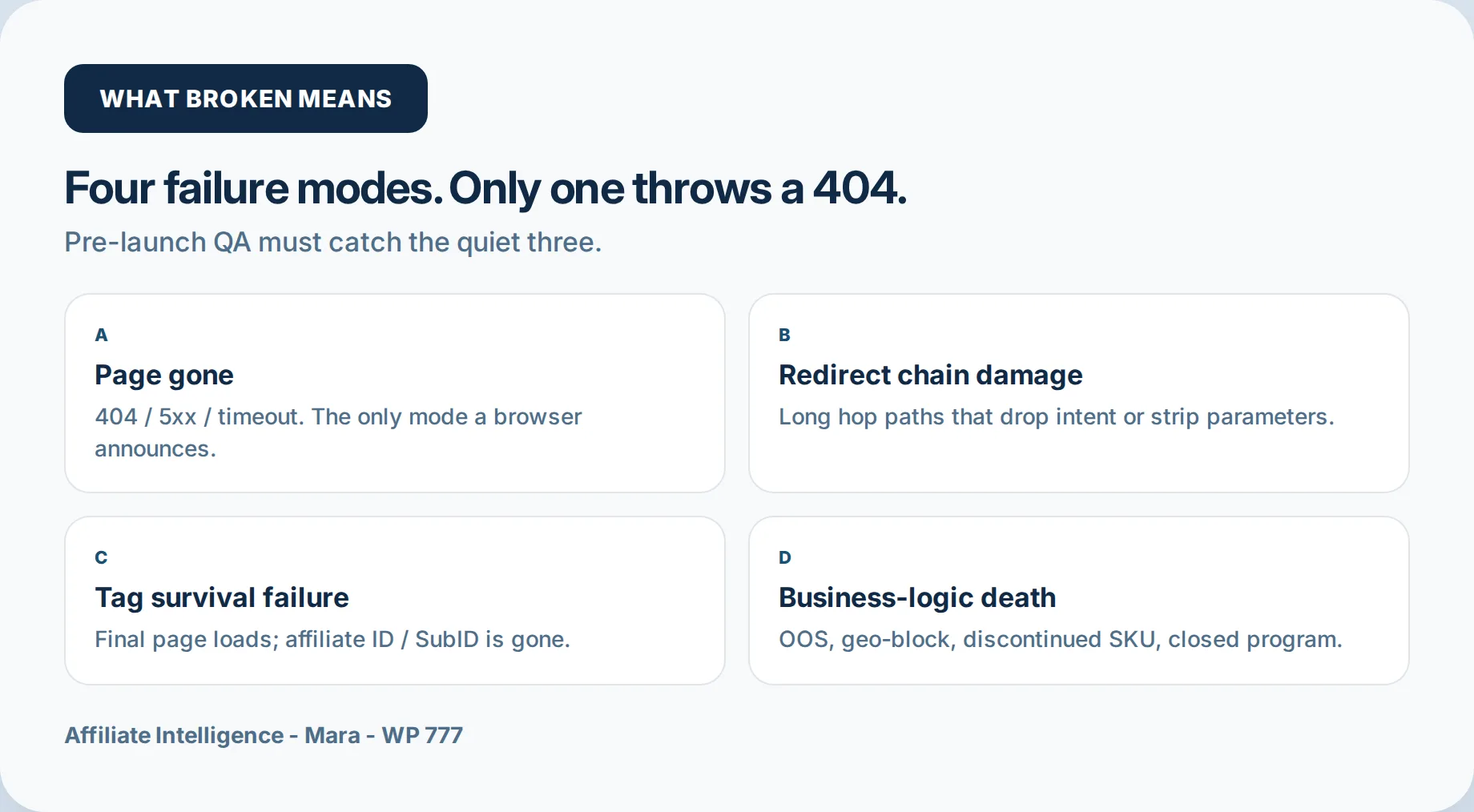
Before I trust a bulk green check, I sort broken into four failure modes. Only the first announces itself.
Page gone is the obvious failure: a 404, a 5xx, a timeout. Your browser tells you. The rest hide.
Redirect chain damage is a link that resolves, but walks six, eight, twelve hops before landing. Somewhere around hop four, a 200 HTML intermediate rewrites the destination and drops the SubID without ever emitting a 3xx. The final page loads; the tracking signal died in the middle. This is the failure class that redirect chain detection tools are built to trace.
Tag survival failure is the page loading perfectly, the product available, the click firing, and the network still not crediting you because the affiliate ID was stripped three redirects ago. One LinkPulse analysis, treated as an attributed estimate, put roughly 20 percent of broken-link revenue loss in this silent parameter-loss category.
Business-logic death is the 200 that should not be promoted: a discontinued product, an out-of-stock variant, a geo-blocked page that loads fine from a US office IP but dead-ends for German traffic, a program that closed. The link looks alive and earns nothing.
Four failure modes, and three of them return a healthy-looking page. That is the whole problem in one sentence. If a monitoring tool only classifies page gone, it is checking reachability, not revenue. A green 200 is not an audit. The leakage forensic audit is the right next stop when a tag has already disappeared mid-chain.
The four-pass validation method
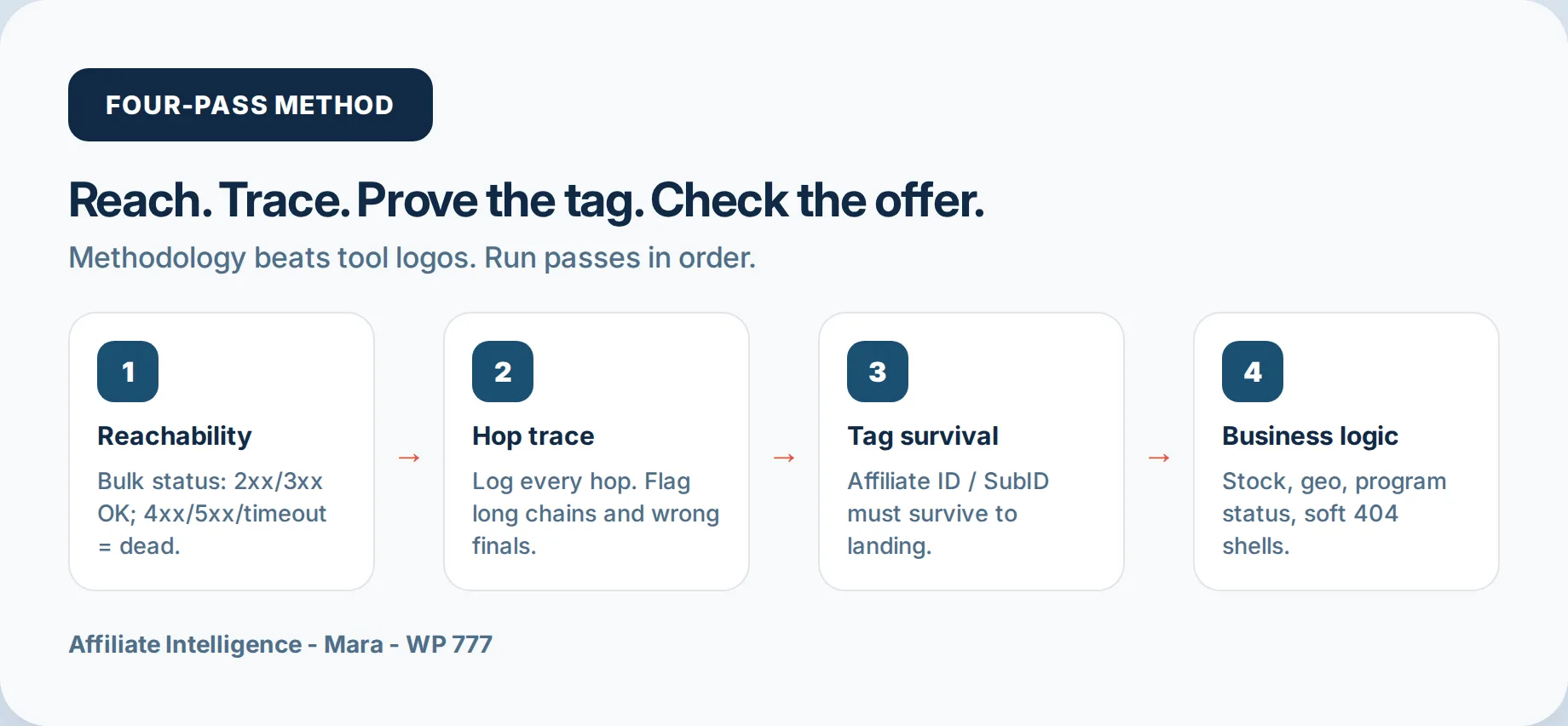
Run these passes in sequence. Each catches a different leak, and no single tool covers every pass. Methodology over software.
Pass 1: HTTP reachability
Check every URL. Accept 200 through 399. Anything returning 404, 5xx, or a timeout is dead. Replace it before launch. At any moment, 3 to 10 percent of live affiliate links are broken, as link rot data repeatedly shows. Reachability is the floor. The floor is not the job.
Pass 2: Redirect chain trace
Trace every hop. The practical rule from the curl protocol in the hop tooling piece is boring and specific: log status code and Location at each hop, stop at the first mismatch. Set a three-hop-or-fewer baseline, flag loops, and flag any final destination that is not the expected product page. A 200 HTML intermediate can consume the query string without a redirect code, so do not trust a blind follow.
Pass 3: Tag survival check
This is the pass generic monitors skip. The query string is the money column. Seed a known test SubID, run the chain, and verify that the affiliate ID or click ID survives to the final landing URL or is captured by the network before the last hop. The LinkPulse analysis cited above put roughly 20 percent of broken-link revenue loss in silent tracking parameter loss precisely because the page loads while the money column goes blank. If SubIDs arrive blank after a hop that looks fine, the SubID blank diagnostic is the adjacent runbook. For parameter naming, the UTM and SubID tracking spine is the reference.
Pass 4: Business logic sanity
The URL can be alive and still wrong. Check stock status, soft 404s, out-of-stock variants, geo reachability, program activation, and mobile-versus-desktop behavior. A soft 404 is a page that returns 200 but is an empty product shell or a “no longer available” notice; a status checker calls it healthy, and a shopper calls it dead. Out-of-stock links are the same class: the page loads, the buy button does not. Geo false positives are common: a link can pass from a US office and fail from the target market, and some checkers support country and device simulation to catch that. Moonpull’s attributed estimate warns that around five percent of advertisers’ tracking implementations change monthly, so a point-in-time reachability pass has a short half-life. Any replacement or removal of a failing link must go through a human-in-loop review before launch; do not auto-swap an affiliate URL on a high-traffic page without checking the replacement destination and tag survival by hand. If clicks arrive but conversions fall after the trace, the conversion drop troubleshooting spine is the next stop.
Triage: what to fix first
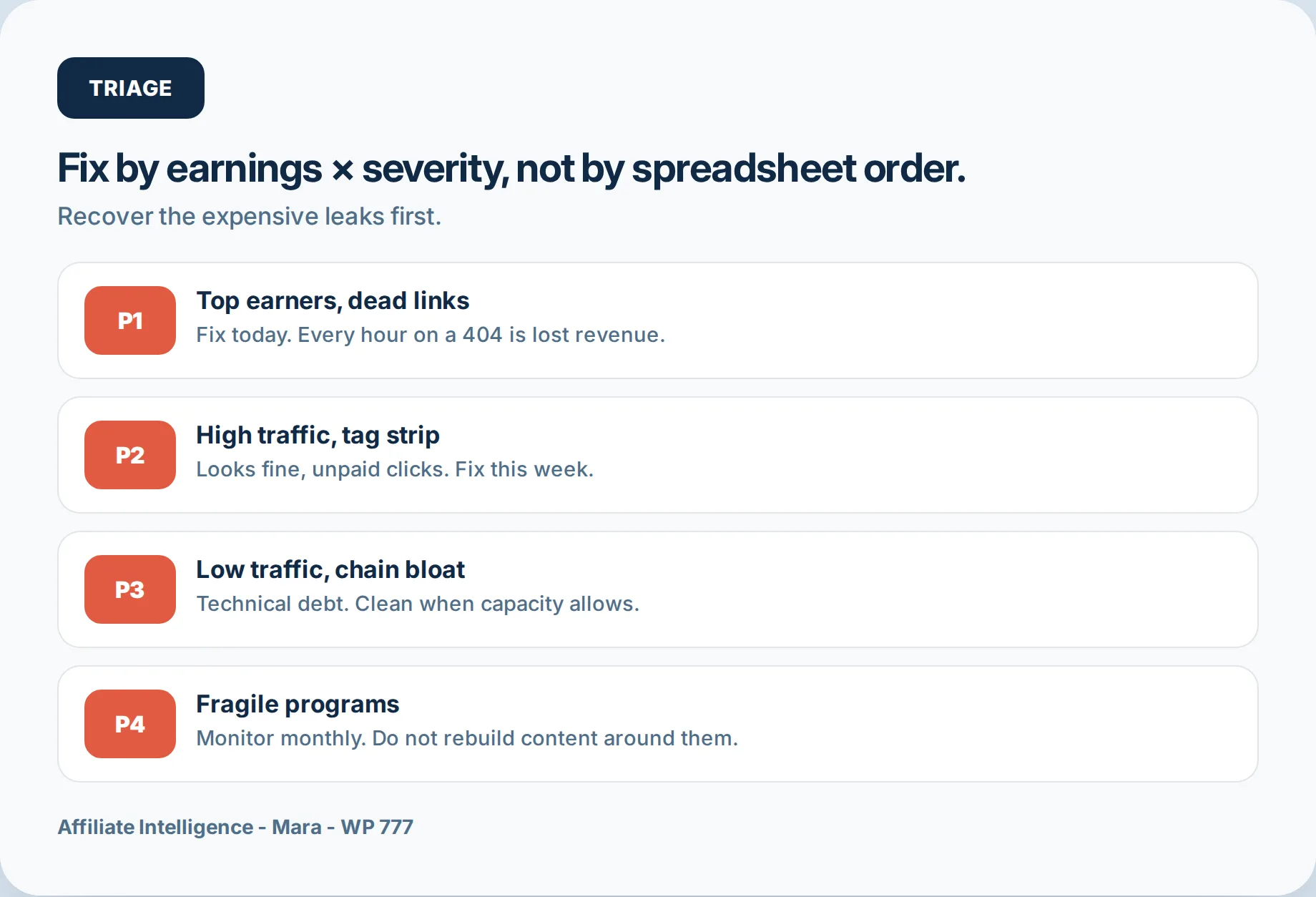
Not all broken links are equal. Sort by revenue and severity, not by recency or spreadsheet order. The cause distribution from one LinkPulse analysis is useful as a rough map: product discontinuation around 40 percent, merchant URL changes around 25 percent, tracking degradation around 20 percent, and network or program closures around 15 percent. The percentages are attributed estimates, but they point one direction: most failures are silent, and only a minority are hard 404s.
Priority 1 is a top-earning page with a dead link or a stripped tag. Fix immediately. Every hour that link sits on a high-traffic page is revenue lost today.
Priority 2 is a high-traffic page with a tag survival issue, where the page loads, the click fires, and you are not paid. Invisible and expensive.
Priority 3 is low-traffic redirect bloat: technical debt that compounds, not urgent but worth cleaning.
Priority 4 is monitor-only: the product is live but the program feels fragile, an old network, a flaky merchant, a program that has not paid on time. Do not rebuild content around those.
Before I trust a bulk green check, I run the decision matrix in this order: sort validated inventory by page earnings descending, then by failure severity. P1 and P2 cluster near the top. Fix those first, and you recover most of the leakage with the least effort.
Schedule + change log + pre-publish gate
The strongest objection to scheduled monitoring is that reactive cleanup feels sufficient. A publisher sees EPC drop, traces the dead link, replaces it, and moves on. The problem with that rebuttal is timing. By the time EPC drops, the loss has already happened; silent failures accumulate in the days before the report exists. Reactive cleanup is a post-mortem. Scheduled health checks are prevention. Moz Link Explorer for affiliate audits is the off-page scout lane (DA/Spam triage on a partial index) - not a substitute for this outbound bulk QA.
The schedule is not perfection; it is cadence. Scan top revenue URLs weekly. Run the full catalog monthly. Add a complete deep-link pass before any known peak: back-to-school, gift-giving season, Prime Day if you are Amazon-heavy, Black Friday. Trackonomics placed UK publisher losses on Black Friday 2018 alone at 575,000 GBP, an attributed estimate, and much of that came from links that looked fine. Waiting for a revenue dip would have booked that loss before anyone looked.
The change log is the lab notebook. Record what changed, when, and the next expected recheck date. If a link passed on the 15th and died on the 20th, the timestamp tells you whether the merchant changed programs or the network restructured links. Silent link edits turn redirect debt into archaeology.
The pre-publish gate is the final rule: validate new links before content goes live, not after commissions stop flowing. Run a quick Pass 1 and Pass 3 on any new URL before it enters your link management system. Thirty seconds per link catches stripped parameters before they scale. Mobile and desktop hops often differ, so if the content gets meaningful mobile traffic, validate that path separately. If the merchant changes redirect flows mid-campaign, the silent commission drops diagnostic is the reference.
One-sitting checklist
If you do one thing today, run Pass 1 and Pass 3 on your top 50 revenue URLs. Fifteen minutes will surface at least three to five issues, and fixing those pays for the time immediately.
- Inventory the top 50 revenue URLs with the five columns above.
- Run Pass 1 on every URL and replace dead links.
- Run Pass 3 on a seeded SubID for every URL that passes reachability.
- Log any fix in the change log with a recheck date.
Short FAQ
Is a final 200 enough? No. A final 200 only proves the last URL resolved. It does not prove the SubID survived hop four, the destination is the product page, or the program is still active. A green 200 is not an audit.
Do mobile hops match desktop? Often no. Advertisers send mobile traffic to app stores, deep links, or different landing pages, and a desktop trace misses half the picture. Validate both user agents separately if mobile traffic matters.
What if a tool says healthy but I still do not get credit? Manually click the link in a private browser window from your target geography. Watch the URL bar through every redirect. Look for your affiliate ID in the final landing URL. If it is missing, the tool missed it. That private-window click is the last resort, not the first pass.
The checklist is boring on purpose. Inventory, four passes, triage, schedule, change log, pre-publish gate. That is the whole system. But it is the highest-return hour you can spend before a campaign launch, and the alternative is finding out from the payout report.