Affiliate Postback Macros: Map Tokens Before You Paste
A postback template is worthless until you map three strings that must carry the same value: the outbound URL parameter, the postback click id token or S2S postback token, and the report field. Prove the click ID persists through the landing hop, and prove with one test that the postback URL parameters expanded instead of staying literal, hardcoded, or a junk test payload. This guide is the map-and-prove checklist, not another primer on S2S plumbing.
Prerequisites: Assemble the Workbench
Before you touch a URL, gather evidence, not screenshots. You need the raw network or tracker tracking link, not the final browser URL after a redirect. You need row-level click report access, not the summary tile. Create one unique lowercase URL-safe test label, something like ddtest1-20260910. Open a private browser window so existing cookies don’t mask the test. If policy allows, line up a controlled test conversion or an advertiser-provided sandbox event. If possible, get access to the raw incoming postback log. Aggregate dashboards won’t show a silent join-key break.
Open the network’s live help docs and search for “postback macros” or “token list.” Capture the exact spelling, bracket style, and character limit for each slot. Save the help page URL and a dated screenshot. This documentation discipline matters because platforms change macro names and limits.
Checkpoint: You can name the raw link, the test label, and the exact help doc URL without looking anything up.
Step 1: Kill the Paste-and-Done Assumption
Three false beliefs sit under most postback failures. First: “Paste the network’s postback URL and you’re done.” Second: “Any {clickid}-looking token will expand.” Third: “The support test postback proves the contract.”
All three are wrong. The network’s postback URL is a template with placeholders. It only works if the placeholders match the receiving system’s own macro set and the click chain carried the right value. A vendor saying “S2S” does not mean your payouts are wired. A green toggle is not attribution proof.
Macro expansion is platform-specific. TUNE and Voluum both document that macros are placeholders the receiving system expands at fire time, not universal strings. If you write cid={gclid} on an Everflow postback, Everflow sees a literal string {gclid} and does not substitute. Later we’ll test for that literal.
Before I trust any template, I reject all three assumptions in writing. Paste the raw postback URL into a text editor, comment out the placeholder values, and verify each against the platform’s macro reference.
Checkpoint: You have written down the three rejected assumptions and have the raw postback URL open in an editor.
Step 2: Know Who Owns the String
Every postback URL parameter is a named container; a macro, also called an S2S postback token, is the placeholder the receiving system expands at fire time. The distinction is positional: the parameter is on the left (click_id=), the macro is on the right ({transaction_id}). Everflow spells this out: “Parameter on the LEFT, macro on the RIGHT.” If you reverse them, {transaction_id}=click_id, the platform does not expand anything meaningful.
Advertiser-side vs affiliate-side ownership matters because the receiving endpoint owns macro expansion. The advertiser’s server fires the postback to the affiliate’s tracker or network. If the advertiser is on Affise, there is no {clickid} macro for affiliate postbacks. You use {sub1} through {sub8} to pass the click ID (Affise help). Affise directionality is a known trap: {clickid} is for outbound tracking URLs, while {sub1} through {sub8} are for inbound postbacks (Everflow platform cheat sheet). That is a scoped rule, not a universal list.
Here is the wrong-end failure. Suppose the advertiser runs Affise and fires a postback to an affiliate tracker that expects {sub1}. The advertiser’s postback URL contains clickid={clickid} because somebody copied the clickid token from the advertiser’s outbound tracking link. The affiliate tracker only expands {sub1}. It sees {clickid} as a literal string, so the postback fires but the click id token never maps to a stored click. The advertiser should instead use the token from the receiving tracker’s own macro set, such as {sub1}, on the postback URL. The {clickid} token is on the wrong end of the URL; it belongs to the advertiser’s outbound tracking link, not the affiliate’s inbound postback.
The rule: the receiving system decides which tokens expand. If you are the affiliate receiving the postback, your tracker’s macros are what the network must use. If you are the advertiser sending the postback, your platform’s macros are what you place in the URL.
Checkpoint: You can classify each string in the postback URL as a static parameter name or an expandable macro, and you know which platform owns expansion for each side.
Step 3: Build the Three-Point Map
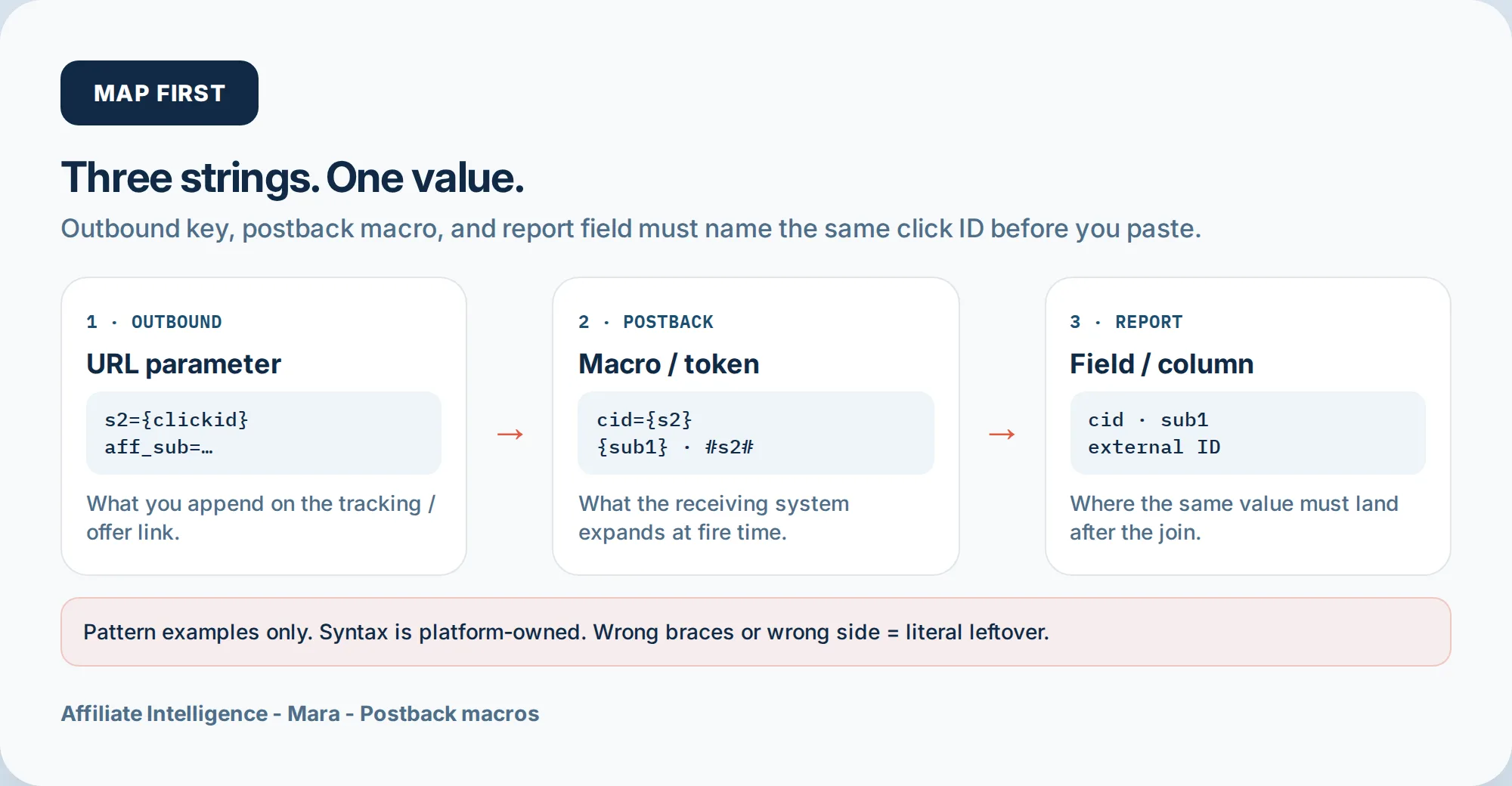
The core job is mapping three strings that must carry the same value: the outbound URL parameter (what you append to the tracking link), the postback macro (what the receiving system substitutes), and the report field (where the value lands). This mapping is only partly a token-syntax problem. Before you decide what to put into sub1, clarify which label the brand can see, because the report field has to be one you can actually use. Write all three columns before pasting anything.
Worked pattern examples, scoped to specific platforms:
- Voluum to affiliate network: you send
s2={clickid}in the offer URL. The network’s postback returnscid={s2}to Voluum. Voluum’s report field shows the external ID undercid. (Voluum postback docs) - CAKE as affiliate: you send
s2={transaction_id}in the CAKE tracking link; the postback to TUNE usestransaction_id=#s2#. CAKE uses hash syntax#s2#, not curly braces. (CAKE guide) - Everflow receiving: if your tracker sent
aff_subas the click ID, Everflow’s postback macro is{sub1}(or{sub2}etc, depending on slot). The report field is the corresponding sub column. - Affise: outbound uses
sub1orsub2; the postback macro is{sub1}. Affise report shows the sub1 column.
These are pattern examples, not a universal token map. Each platform has its own syntax and names; check live docs. One common mismatch: parameter name vs token syntax. Writing cid=#s2# on a network that expects {s2} leaves the hash marks literal. The name is right, the syntax is wrong.
Checkpoint: You have a written three-column map for the click ID and each SubID you intend to use, with the exact macro syntax from the network’s live docs.
Step 4: Persist the Click ID Through the Landing Hop
If the hop drops the token, later S2S has nothing to match. This is the prelander/redirect drop problem. The click ID dies in a redirect, and the postback cannot return it. Fix persistence before blaming the network.
The flow: your tracking link carries the click ID into the network and then into the advertiser landing page. The advertiser’s system must capture that value and store it in the session. TUNE says offer URLs carry the transaction ID to the advertiser landing page. If a prelander or cloaking redirect strips query parameters, the click ID never reaches the advertiser. That’s a silent kill.
Check the raw landing URL after each redirect. Use a tool like the redirect chain detector to see what survived. If your cloaking setup strips parameters, that’s a separate issue, cloaking and parameter-strip guide. Forward the click ID explicitly through any prelander: JavaScript that reads the query param and appends it to the next hop, or server-side rewrites.
Everflow’s postback validator flags missing transaction_id as a top error. If the landing page did not receive the ID, the postback will fail. The report column stays blank, and you’ll blame the network when the chain broke upstream. If the column stays blank after a correct map, diagnose the blank SubID or report column.
Checkpoint: After clicking your test link, the final landing URL (after all redirects) still contains the click ID in the expected parameter, and the click report shows it stored.
Step 5: Reject Literal Macros and Hardcoded Click-ID Slots
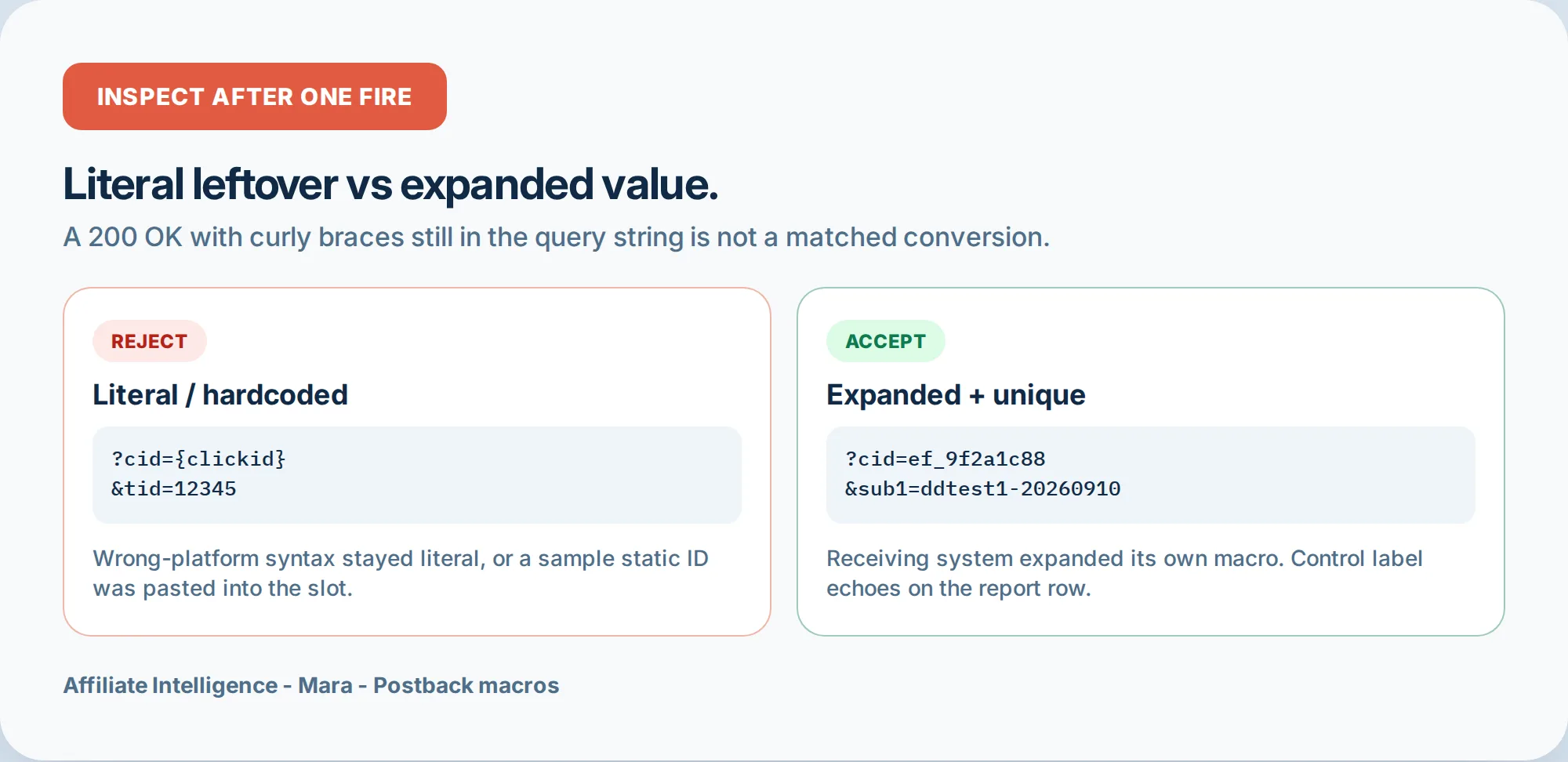
After one fire, inspect the live request. If you see %%TOKEN%% or {clickid} left literal in the postback query string, the platform did not expand its own macro. That means you used a token from a different platform’s syntax. A platform only expands its own macros.
Examples: Everflow uses curly braces {transaction_id}; CAKE uses hash #s2#; Affise uses {sub1} through {sub8} but not {clickid}. If you paste an Everflow URL into a CAKE field and it contains {transaction_id}, CAKE will leave that literal string. The postback fires, the endpoint returns 200, and no conversion matches.
The second rejection: hardcoded click-ID or SubID slots. If your postback URL has transaction_id=12345 instead of transaction_id={transaction_id}, every conversion looks identical. The S2S postback click id token never expands because you wrote a static value. This often happens when someone copies a “sample” postback URL from support and forgets to replace the example value with the macro.
If the tick is green but tokens mismatch, soft-link the S2S failure map. That page maps literal macro and token mismatch failures in detail.
To inspect: use the network’s postback log or a request bin (webhook.site) as the endpoint. Fire one test conversion and look at the raw incoming request. If you see any literal token or hardcoded value, reject it.
Checkpoint: Your raw postback log shows the macro expanded into a unique value, not the literal placeholder, and no static click-ID string.
Step 6: Reject Junk Test Postbacks Before You Trust Support
A green test postback from support does not prove the contract. Many network test tools send fake macro data. ClickBank’s integration guide says test events use “fake data defined by ClickBank.” Everflow’s tester simulates with sample values. A test that returns HTTP 200 with fake values proves the endpoint answers, not that your real click chain will survive.
Two specific junk patterns:
-
Wrong schema: the test postback sends a JSON body when your endpoint expects GET query parameters, or sends parameters your tracker doesn’t recognize. Missing
Content-Typeon a POST, or using POST when the endpoint requires GET. Everflow explicitly requires GET for S2S postbacks (Everflow validator); Stripe/Shopify defaults to POST, causing silent failures. -
Unrelated payload: support sends a test with
transaction_id=test123that doesn’t match any stored click ID. The endpoint returns 200 but no attribution row appears. That’s a junk test. Demand a contract-matching sample: a postback carrying a real click ID from a click you generated, with the exact schema your endpoint is configured to receive.
Before escalating forever, ask support: “Send me the exact postback URL you fired, parameter-by-parameter, and the response body. Not a screenshot of a green tick.” If they cannot produce the raw request, treat the test as unproven.
I’ll say it again: a test postback is only valid if it uses your actual macro syntax, your actual schema, and a click ID that exists in your click report.
Checkpoint: You have a contract-matching sample from support, not a generic test with fake data, or you’ve declined to trust it.
Step 7: Prove Expansion with One Controlled Test Before Volume
Opening a page is not proof. A dashboard tile turning green is not proof. The only proof is one controlled test conversion with a unique control label that returns on the postback and matches the click row.
Here’s the protocol, using Voluum’s guidance: substitute a real click ID into the postback template manually and confirm the conversion count increases by one. But do it end-to-end.
- In a private window, click your tracking link with the test label appended, e.g.
&sub1=ddtest1-20260910. - Confirm the click row appears in the tracker/network with the click ID and sub1 stored.
- Complete one controlled test conversion (sandbox event or real low-risk action where policy allows).
- Inspect the raw incoming postback log. The query string must carry the same click ID and sub1, and no literal macro.
- Confirm a matched conversion row appears in the report with the sub1 value exactly
ddtest1-20260910.
If you need the full happy-path handshake, soft-link to the S2S handshake primer. If the tick is green but tokens mismatch, use the green-tick failure map linked earlier.
One test is the gate. Do not send volume until that single row matches.
Live-doc habit: after proving expansion, save the functioning postback URL with a comment showing the three-point map and the date tested. When the network changes a macro name, you have a reference.
Adjacent traps: Floodlight/DSP tags are not affiliate postbacks; Amazon closed passback has ceilings; performance partners expect real S2S, not a forwarded pixel. The gclid-into-SubID beat is lightly covered in the tracking spine guide. If a dedicated tracker owns the map, compare DIY vs paid tracker.
Checkpoint: Exactly one matched conversion row with the unique control label returned, and no literal token in the raw request.
Troubleshooting Common Issues
Symptom: macro not expanding or literal macro remains in postback log.
Fix: Wrong platform’s syntax. Check token style: curly braces vs hash vs percent signs. Replace with the receiving system’s documented macro. If the network says “no clickid macro,” use their sub macro (e.g., Affise {sub1}).
Symptom: postback never fires.
Fix: Check endpoint protocol (GET vs POST), HTTPS, IP allowlist, and whether conversion status triggers postback. Everflow retries then disables after consecutive failures; TUNE returns 200 even for unsuccessful processing. Inspect raw logs.
Symptom: blank report column after a correct map.
Fix: The click ID may not have been stored on the click side. Soft-link the blank column diagnostic.
Symptom: green tick but tokens mismatch.
Fix: Soft-link the green-tick failure guide. That page maps literal macro, wrong-side tokens, and silent 200 failures.
Symptom: duplicate conversions.
Fix: Add a dedupe key, usually order_id or transaction_id. Everflow uses order_id for duplicates; confirm both pixel and postback aren’t double-firing.
Symptom: test postback from support succeeded but real conversion doesn’t.
Fix: The test used fake data or wrong schema. Demand a contract-matching sample as in Step 6.
Symptom: click ID not present on landing page.
Fix: Check redirect chain; fix persistence before blaming the network. Soft-link the redirect chain detection tool.
Checkpoint: You can map each failure to a specific fix or a sibling article.
This-Week Map-and-Prove Checklist
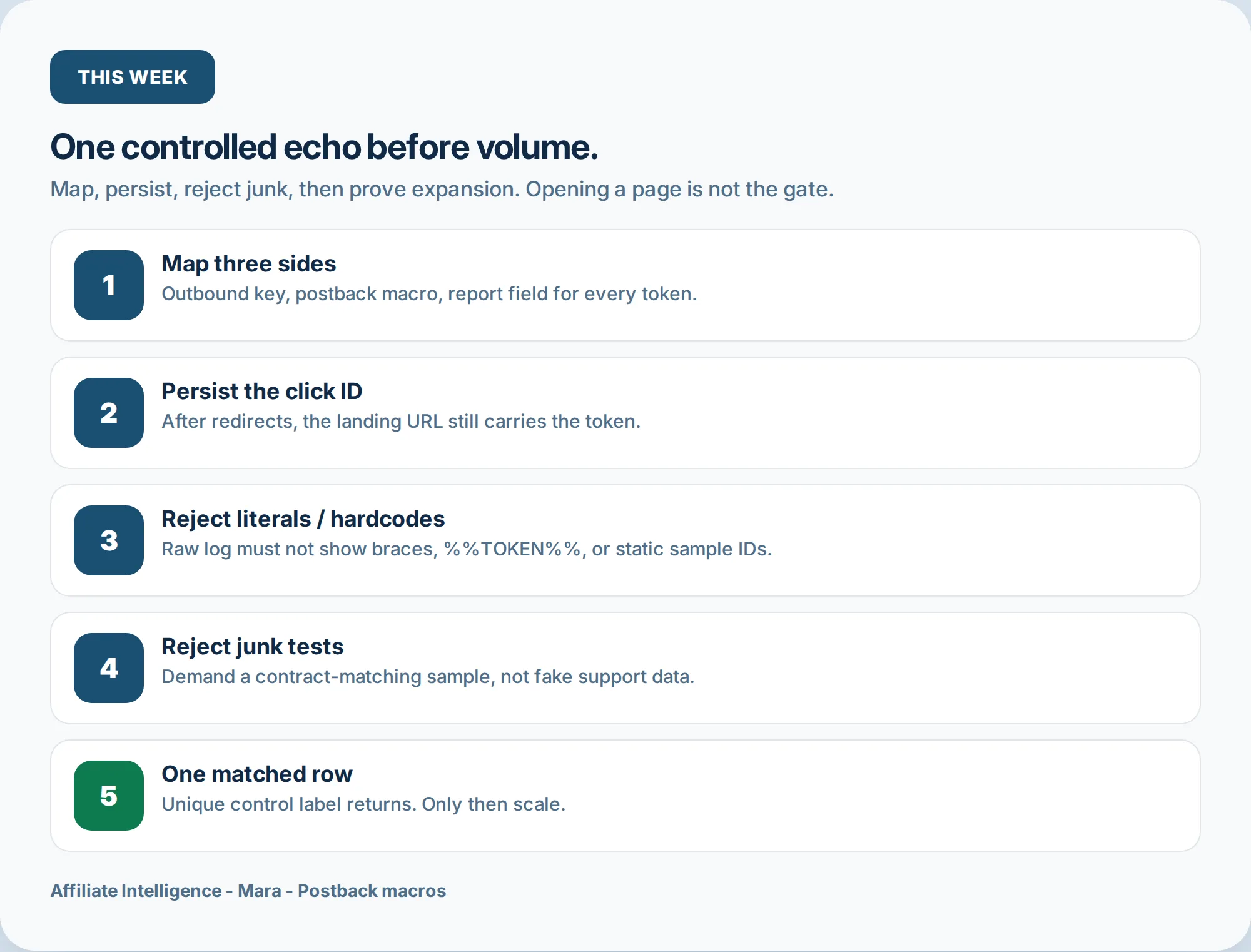
- Map three sides: outbound key, postback macro, report field, for every token you use.
- Persist ID: click the raw link, confirm the landing URL after all redirects still carries the click ID.
- Reject literals: inspect raw postback log for
%%TOKEN%%,{clickid}, or hardcoded values. - Reject junk tests: demand a contract-matching sample from support.
- One test echo: fire one controlled conversion with a unique label; confirm matched row with no literal.
If the tick is green but tokens mismatch, hand off to the green-tick failure guide. If the report column stays empty after a correct map, hand off to the blank-column diagnostic. If you need the full handshake primer, start at the S2S tracking guide. Go or no-go before volume.