Diagnosing Silent Commission Drops When Merchants Change Redirect Flows
Operators often open a clicks-versus-commissions mismatch and reach for one of two conclusions: the merchant cut the rate, or the wall of green 200s means tracking is fine. Both are guesses. Neither names the exact hop that breaks attribution. This tutorial walks through a merchant-side redirect-change diagnostic protocol: name the silent saboteur, classify which parameter-death pattern you are in, prove the death hop with a seeded SubID trace, then decide whether you escalate, pause, or diversify.
Prerequisites: Audit kit before you blame the merchant
Before I trust a green click row, I assemble the kit. Five items. Skip any one and you will argue about the wrong problem.
A clean browser profile: no cookies, no saved sessions, no parameter-stripping extensions. ClearURLs, privacy blockers, and coupon-style extensions will fake a strip that is not the merchant’s fault. A seeded affid or SubID in the exact parameter your network expects. Impact wants subId1 or subId2, CJ wants sid, Awin wants clickref, Amazon wants tag. Wrong spelling means the network silently drops the value before the first merchant hop even fires. A one-hop-at-a-time trace method. curl -I without -L is the operator default. Do not blind-follow, because the evidence hides in the intermediate hops. Access to the network click report for the date range in question, so you can separate an attributed click from a stripped one. A blank evidence log: timestamp, hop list, query string in and out, death hop, final URL.
Do not skip the seeded SubID. A trace without one tells you where the chain goes. A trace with one tells you whether the money column survived. That difference is the whole audit.
Checkpoint: You can name your network’s payout parameter and paste a seeded test value into a live link.
Why silent commission drops look healthy on every dashboard
Step 1: Split the mismatch into two testable hypotheses before you touch a trace.
Network dashboards report attributed clicks, not stripped ones. The click counter increments on the first network hop, the one before the merchant’s analytics, CDN, or rebrand redirect inserts itself. What happens after that first redirect does not touch the click count. So a dashboard that shows clicks intact and commissions flat is not proof that tracking works. It is proof that the counter works.
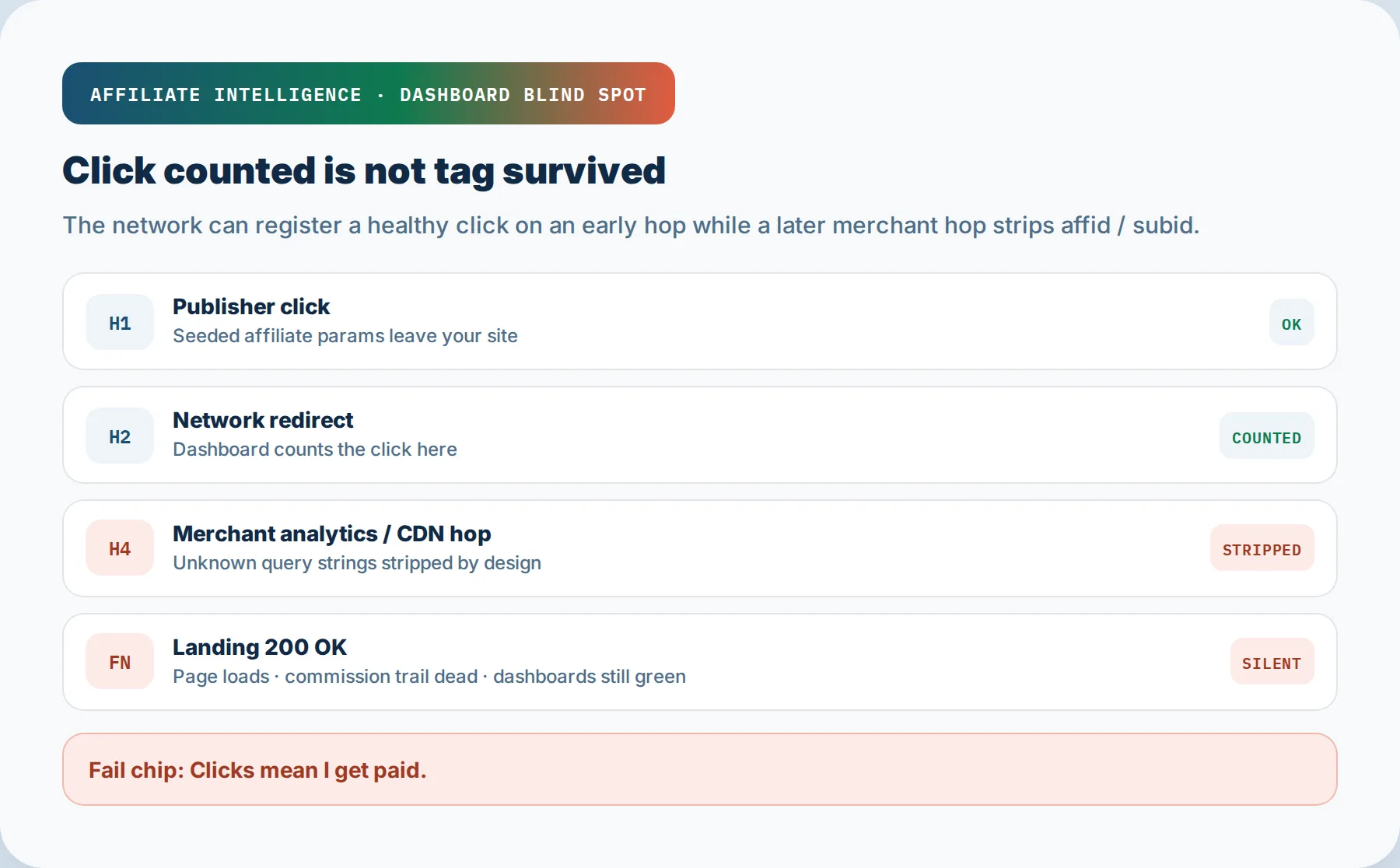
A common failure mode: the merchant engineering team inserts a new analytics or CDN hop, ships a rebrand redirect, or consolidates domains. The new hop strips unknown query parameters, including your affid or SubID, because the developer wrote a bare destination string instead of a query-string pass-through. The dashboard row stays green. The tag is gone by hop four. There is no alert, because the merchant’s internal dashboards are built to look healthy too.
Worse, change is the default, not the exception. Around 5% of advertisers’ affiliate tracking implementations change each month, with up to 14% of commission potentially lost to consent-controlled tracking. A dashboard is a counter, not a monitoring system.
The structural scenario is common: a publisher with stable clicks around 3,200 per month sees commissions slide hard across a few weeks while clicks stay flat. Traffic unchanged. The network dashboard shows clicks fine, conversions down. Without a hop trace, the conversation blames traffic quality. With a hop trace, the death hop shows a merchant analytics insert that stripped the parameter. Same symptom, two completely different fixes. See silent attribution breaks diagnose and fix for the full failure taxonomy.
Two hypotheses, both testable. Hypothesis A is merchant economics: the click logged, the conversion logged, and the commission was reversed, held, or reclassified at the payout layer. You see a logged row that gets clawed back or stuck in pending. Hypothesis B is a chain break: the click never carried your identifier far enough for the conversion to match back. There is no logged commission row, because attribution never fired.
A green 200 does not distinguish between these. A final page can load perfectly while the SubID was stripped three hops earlier.
The network hop increments the click counter before the merchant’s new redirect strips the parameter. Both dashboards stay green. The fail chip on the wall is “clicks mean I get paid.” They do not; clicks mean the counter incremented.
Checkpoint: You have written both hypotheses down and know which one the hop trace must confirm or rule out.
Three patterns of parameter death
Step 2: Classify which pattern you are in. You cannot fix a pattern you cannot name.
Three structural patterns account for most silent drops when a merchant changes redirect flow. Each has a different fingerprint, a different evidence trail, and a different fix conversation.
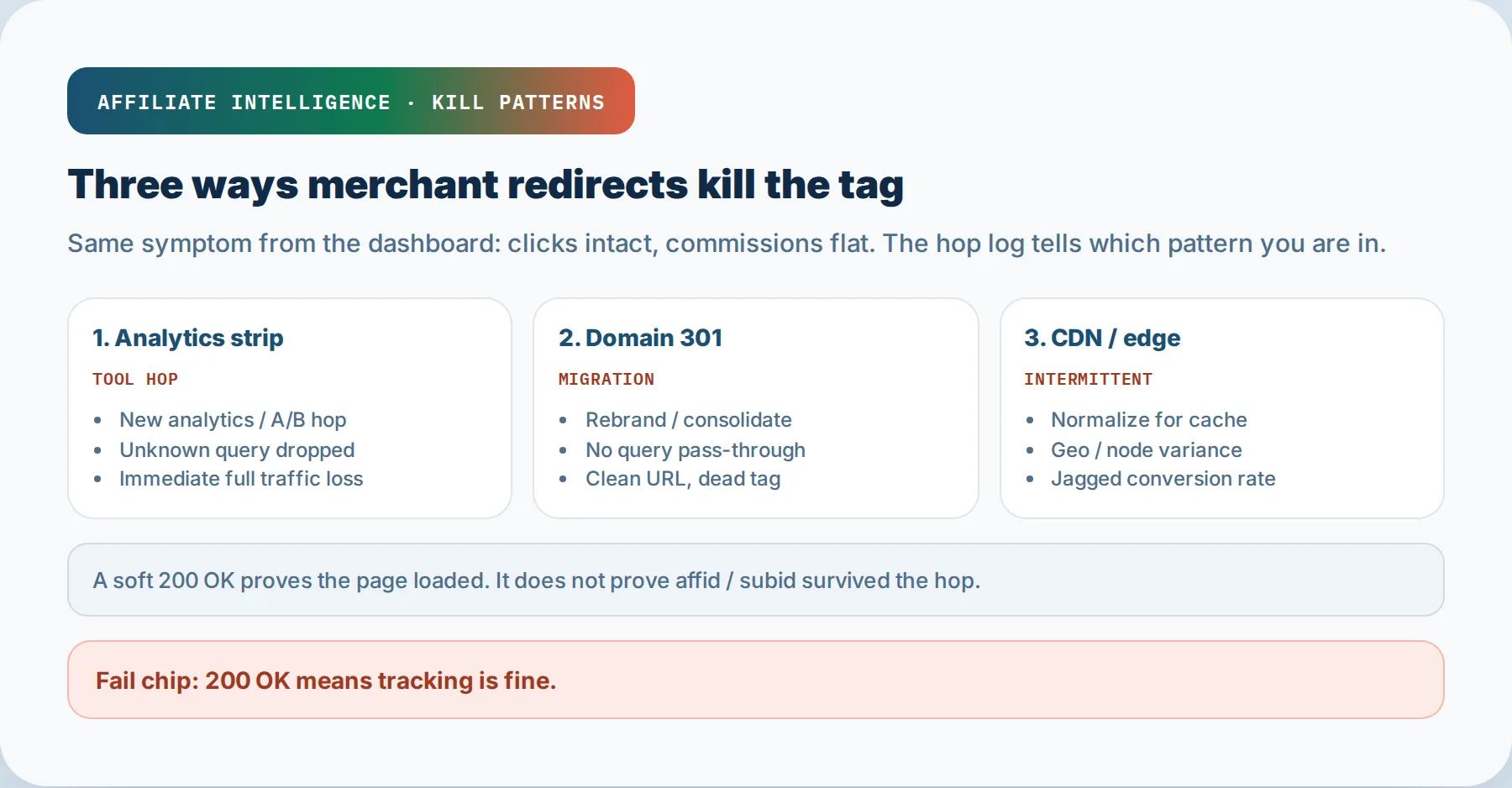
Pattern A: Analytics or tooling hop strips unknown query parameters. The merchant adds a marketing automation, consent management, or analytics redirect between the network hop and the product page. The new hop forwards the path but not the query string. You see this in the trace as a healthy 200 or 302 that drops the ?affid=... tail. The merchant’s own analytics still work, which is why nobody on their side noticed. Their dashboards read UTM or first-party identifiers, not your network parameter.
Pattern B: Domain 301 without query preserve. The merchant migrates or rebrands. Old URLs 301 permanently to new URLs, but the developer wrote a bare destination without a QSA flag or query-string preservation rule. The path resolves, the parameter dies. A 301 with a bare destination is the classic kill. Shopify migrations are a known trigger: 200+ affiliate links map from old product paths to new ones, and the query string must be explicitly preserved or the AffiliateID evaporates.
Pattern C: CDN or edge redirect with intermittent or regional stripping. The merchant routes traffic through a CDN or dispatcher layer. Query parameters like utm, gclid, or network IDs disappear on some requests but not others, often regional, often device-specific. Adobe Experience Manager documented exactly this failure: CDN-level redirects using reqProperty: path drop all query parameters, while reqProperty: url preserves them. You test once from a US office and see a pass, while buyers in Germany or on mobile hit a stripped chain.
The shared tell: a soft 200 OK at the final URL. The page loads. The browser shows a working product page. The commission silently misses. I’ll say it again: a 200 is not affiliate health. It is a page rendering.
The three kill patterns are analytics strip, domain 301 without query preserve, and CDN/edge intermittent strip. The fail chip is “200 OK means tracking is fine.” It does not.
Checkpoint: You can classify your drop as A, B, or C, or name the combination, before you trace anything.
Tag survival testing and the final-URL trap
Step 3: Trace one hop at a time with a seeded SubID. Stop at the first mismatch.
The query string is the money column. Use one known value across every hop; subtest-2026-08-29-a works fine. ASCII only, no spaces, no special characters. The moment you see the value missing or altered, stop tracing. That hop is the death hop. Running past the first mismatch muddies the evidence.
The exact command:
curl -I "https://tracker.example/click?subid=subtest-2026-08-29-a"
Read the status and Location header for the first hop. Copy the Location target and request it directly. Repeat one hop at a time. After each request, check whether the seeded value still appears in the URL or Location header. Stop at the first mismatch.
A pass means the payout parameter reached the final destination. A fail names the hop that killed it. If curl -I returns a 200 HTML intermediate holding a meta refresh, check the body, not just the headers. A 200 HTML hop can hold a JavaScript or meta refresh that rewrites the destination without ever emitting a 3xx. The SubID vanishes on that hop and a blind -L follow swallows the evidence. Log two columns at every hop: query string in, query string out.
Shorteners count. Test them the same way. Some shorteners strip parameters; others preserve them cleanly. Test before you publish the short link, never after.
The final-URL trap. Never promote the post-redirect final URL. Operators who click an affiliate link, watch the browser settle on a clean merchant URL, then copy that browser address into their content have bypassed the tracking path entirely. The final URL is the destination after the redirect chain has already done its job. No affiliate redirect, no click ID, no cookie or postback handoff, no attribution. The page loads fine. The odds of a tracked sale are slim.
One nuance: a dropped parameter is not automatically a broken chain. Many networks attribute with a cookie set at an intermediate hop, not with a value on the final URL. The network redirector receives the click, writes its cookie, and forwards to a clean merchant URL on purpose. Treat a dropped verdict as a strong lead, not a payout verdict. Confirm with a real click and the network click log before you rewrite anything.
For a deeper hop-by-hop forensic pass, the redirect chain commission leakage audit covers the full tool-tier map and 200-HTML intermediate traps. For blank SubID columns specifically, the SubID tracking not showing up diagnose article walks through parameter naming, link-builder requirements, and reconciliation lag. This article owns merchant-side change detection and the proof protocol; the other two own the deeper tool picker and the blank-column sequence.
Checkpoint: You have a pass/fail verdict per hop and can name the exact hop that killed the tag.
The 15-minute proof pack for the affiliate manager
Step 4: Convert the trace into a reproducible escalation pack. Do not send “your tracking is broken.” Send the death hop.
A proof pack converts a vague EPC complaint into a bug report engineering can act on. Fifteen minutes, six items:
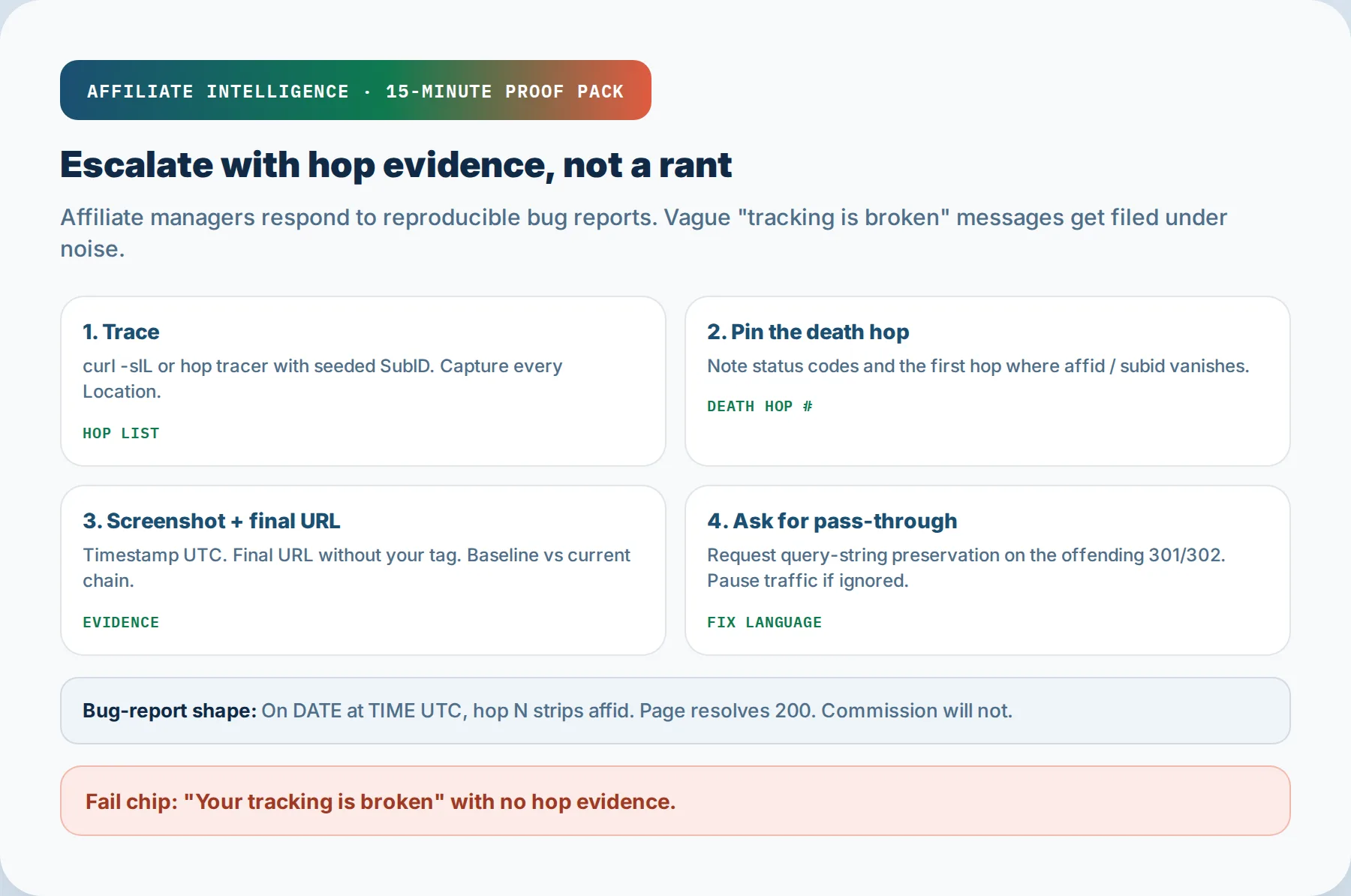
- Timestamp, with timezone, from the trace run or the failed click.
- Hop list, full: status code, Location header, query string in/out per hop.
- Death hop, named. “Hop 4 - analytics.example redirects to bare /product, query string gone.”
- Final URL, shown without the tag you seeded, to prove the parameter did not arrive.
- Calm bug-report wording. “Affiliate parameter
subidsurvives the network hop and dies on the merchant redirect at hop 4, which appears to be an analytics insert. The expected final URL should carrysubid=subtest-2026-08-29-a. Requesting query-string pass-through from this hop.” No accusations. Name the component, not the person. - The pass-through ask, stated as engineering language. Ask for “query-string pass-through” or “QSA flag” or “preserve query parameters” on the redirect rule. This is the phrase the developer can hand to a config. Cloudflare’s redirect rules call it “Preserve query string.” Apache calls it QSA. Every platform has the phrase; use the right one.
Why calm matters: affiliate managers can forward a bug report. They cannot forward an accusation. A proof pack built as “here is the trace, here is the hop, here is the fix language” is a forwarded item. A message that says “your tracking is broken” is a relationship cost.
The pack is reproducible when an engineer can run the same trace and hit the same failure without asking you a follow-up. That means the exact URL you tested, the exact seeded value, and the exact hop where it died. If the engineer has to guess, the ticket stalls.
For escalation mechanics and where commissions disappear during a full network or platform migration, the commissions during merchant network migration article covers the ledger side. This pack covers the redirect-change side; do not conflate them.
The proof pack has three parts: trace hops, screenshot of the death hop, and calm bug-report wording plus baseline log. The fail chip is “Your tracking is broken” with no hop evidence.
Checkpoint: You have a named death hop, a timestamped trace, and a calm bug-report draft using the correct pass-through phrasing.
Baseline log, monitoring, and pre-promote questions
Step 5: Make the next silent change visible before it costs you a payout cycle.
The diagnostic protocol above is reactive. The prevention ritual is the same tooling pointed forward.
Baseline change log for top earners. Keep a lightweight change log for your top 10 to 20 revenue pages. One row per change: date, merchant, URL, seeded SubID used, hop count, pass/fail, final URL, screenshot record. A change log is not a monitoring SaaS; it is a discipline. Older high-earning pages earn the most and rot the fastest, so prioritize them in any audit.
Pre-scale path validation. Before you scale earned media, paid push, or a major promotion, run the tag-survival trace on the exact link the traffic will click. Clean browser, known SubID, exact merchant URL. If the ID does not survive to the final URL, fix the chain before you spend. The bulk affiliate link validation checklist covers the broader link validation sweep; this ritual covers the merchant-side hop survival check for a single high-exposure path.
Two pre-promote AM questions. Before you hand a merchant new volume, ask the affiliate manager two questions. One: when did the redirect flow last change, and was query-string preservation tested on the new hop? Two: is there monitoring on the merchant side that catches parameter stripping on redirects, or do you depend on affiliates to report it? Both questions are professional. Both are boring. Both save a three-week commission slide.
Decision tree when they will not fix. If the merchant will not add query-string pass-through after you show the death hop, I recommend three moves. Pause the page and timestamp the evidence, because running volume into a stripped chain is free traffic for the merchant. Diversify to a competing program that tracks cleanly. Or keep the link live only behind your own redirect layer that preserves the query string and logs every click server-side; that fixes your visibility, not the merchant’s attribution. It does not force them to pay.
Thin adjacent: last-click coupon and app steal. If the trace passes and the commission still does not land, the problem is not a redirect strip. It is last-click overwrite at checkout from coupon extensions, cashback apps, or merchant app sessions. That is a different failure class, adjacent to this one but not the same diagnosis.
For server-side postback failures that still show a green tick, see S2S postback failures behind a green tick. For UTMs, SubIDs, and server-side proof fundamentals, the tracking best practices UTMs SubIDs S2S article covers the base layer.
Checkpoint: You have a baseline log started, a pre-promote question script, and a decision rule for when merchants will not fix.
Troubleshooting common silent-drop failures
Rapid triage. Each row matches a symptom to the first check.
The closing thesis: a green click row with a dead tag on hop four is free traffic for the merchant. Prove the hop, then decide whether to fix, pause, or diversify. Dangerous leaks look like nothing on a trusted dashboard; the click row stays green, the page loads, and the payout report comes back thin weeks later. Name the hop before you argue economics. Then decide.
Checkpoint: You can classify any silent-drop symptom into one of these first checks and route the fix to the right sibling article.